19.Ⅱ 高级指南
📝 模块更新日志
- 新特性
-
HTTP远程请求UriBuilder配置操作 4.9.8.45 ⏱️2026.04.19 56be6c6 -
HTTP声明式请求支持面向对象继承 4.9.8.42 ⏱️2026.04.17 b00f2b9 -
HTTP远程请求支持设置永不超时 4.9.8.21 ⏱️2026.03.09 92e0283 -
HTTP远程请求支持发送不进行URL编码的表单数据 4.9.8.15 ⏱️2026.02.09 f0104ef -
HTTP远程请求声明式请求支持Action<HttpRequestMessage>冻结参数 4.9.7.244 ⏱️2026.01.09 d9fce11 -
HTTP远程请求支持HttpRequestBuilder统一配置器IHttpRequestBuilderConfigurer4.9.7.244 ⏱️2026.01.09 d9fce11 -
HTTP远程请求支持提供从互联网URL地址下载文件流配置HttpClient和HttpRequestMessage实例 4.9.7.235 ⏱️2025.12.27 a723ae5 -
HTTP远程请求设置请求标头和Cookie支持配置参数 4.9.7.231 ⏱️2025.12.19 541fadd -
HTTP远程请求支持指定网卡IP地址请求 4.9.7.230 ⏱️2025.12.19 904705d -
HTTP远程请求HttpBuilder静态类,用于简化HttpRequestBuilder名称过长问题 4.9.7.222 ⏱️2025.12.08 c0b6c77 -
HTTP远程请求分析日志支持颜色高亮 4.9.7.217 ⏱️2025.12.03 29b9348 -
HTTP远程请求支持设置JSON响应反序列化包装器 4.9.7.214 ⏱️2025.11.26 f046b4d ebe71f9 -
HTTP远程请求支持在未配置日志服务时设置日志回退输出委托 4.9.7.213 ⏱️2025.11.26 17ac155 -
HTTP远程请求在设置JSON数据时支持传入JsonSerializerOptions对象 4.9.7.208 ⏱️2025.11.16 c97b467 -
HTTP远程请求支持自动修复无效的响应字符编码 4.9.7.202 ⏱️2025.11.13 35530e8 -
HTTP远程请求支持表单名称命名策略或自定义转换器 4.9.7.137 ⏱️2025.11.07 6c175a8 -
HTTP远程请求断言功能 4.9.7.137 ⏱️2025.11.07 c044b87 -
HTTP远程请求默认启用响应内容gzip、deflate和brotli自动解压 4.9.7.137 ⏱️2025.11.07 e9b10ac -
HTTP远程请求请求分析工具Profiler(enabled)别名方法:Debugger([enabled])4.9.7.137 ⏱️2025.11.07 c044b87 -
HTTP远程请求支持添加动态URL参数(请求时求值)4.9.7.131 ⏱️2025.10.17 a162c8d -
HTTP远程请求压力测试支持便捷禁用HTTP缓存 4.9.7.131 ⏱️2025.10.17 a162c8d -
HTTP远程请求支持配置多线程下载文件 4.9.7.123 ⏱️2025.09.16 10bddc9 -
HTTP远程请求支持将XML字符串转换为类型对象 4.9.7.123 ⏱️2025.09.16 41746d2 -
HTTP远程请求构建器实例支持When条件构建 4.9.7.100 ⏱️2025.07.22 651b4d5 -
HTTP远程请求扩展功能构建器WithRequest(Action<HttpRequestBuilder>)方法 4.9.7.95 ⏱️2025.07.10 4615670 -
HTTP远程请求声明式[MultipartObject]特性 4.9.7.94 ⏱️2025.07.09 7e52e9c -
HTTP远程请求支持Unix epoch日期格式 4.9.7.77 ⏱️2025.05.31 ca9c94e -
HTTP远程请求URL参数格式化程序 4.9.7.70 ⏱️2025.05.23 e8b24b3 -
HTTP远程请求支持配置SocketsHttpHandler忽略SSL证书验证 4.9.7.63 ⏱️2025.05.16 042da35 -
HTTP远程请求支持配置请求超时发生时的回调操作 4.9.7.62 ⏱️2025.05.15 23a580d -
HTTP远程请求HttpRemoteClient静态类 4.9.7.58 ⏱️2025.05.02 86e9dbe -
HTTP远程请求HttpRemoteResult<TResult>解构函数(析构表达式)功能支持 4.9.7.53 ⏱️2025.04.28 e4dcc10 -
HTTP远程请求IHttpClientBuilder.ConfigureOptions(configure)扩展方法 4.9.7.51 ⏱️2025.04.26 33479e2 -
HTTP远程请求请求分析工具打印HttpClient Name项 4.9.7.51 ⏱️2025.04.26 33479e2 -
HTTP远程请求WithSuccessStatusCodeHandler方法支持设置请求成功状态码回调操作 4.9.7.47 ⏱️2025.04.20 cf7956e -
HTTP远程请求状态码处理程序支持~符号设置区间,如200~2994.9.7.47 ⏱️2025.04.20 cf7956e -
HTTP远程请求SetOmitContentType(omit)方法支持移除或保留请求内容的Content-Type4.9.7.44 ⏱️2025.04.17 4d98d60 -
HTTP远程请求支持从JSON字符串创建HttpRequestBuilder实例 4.9.7.41 ⏱️2025.04.14 580dd04 -
HTTP远程请求支持使用SuppressExceptions()和[SuppressExceptions]抑制请求异常 4.9.7.40 ⏱️2025.04.12 1a9bc7b -
HTTP远程请求支持设置单次请求的HTTP版本 4.9.7.40 ⏱️2025.04.12 1a9bc7b -
HTTP远程请求请求分析工具打印HTTP Version项 4.9.7.40 ⏱️2025.04.12 1a9bc7b -
HTTP远程请求HttpRemoteResult<TResult>类型Version属性(HTTP版本) 4.9.7.40 ⏱️2025.04.12 1a9bc7b -
HTTP远程请求支持设置请求来源地址 4.9.7.36 ⏱️2025.04.02 5d4a241 -
HTTP远程请求HttpRequestBuilder.AddAuthentication(string, string?)重载方法 4.9.7.33 ⏱️2025.03.25 f8a648a -
HTTP远程请求多部分表单AddFile(IFormFile)和AddFiles(IEnumerable<IFormFile>)扩展方法 4.9.7.31 ⏱️2025.03.24 6eb54e0 -
HTTP远程请求反序列化时支持Number和Boolean类型转String类型 4.9.7.29 ⏱️2025.03.23 489aa55 -
HTTP远程请求序列化时自动处理中文乱码问题 4.9.7.29 ⏱️2025.03.23 489aa55 -
HTTP远程请求进行JSON反序列化时支持非ISO 8601-1:2019标准的时间字符串 4.9.7.25 ⏱️2025.03.14 10de94b 3f3d619 -
HTTP远程请求支持为所有HttpClient客户端添加配置IHttpRemoteBuilder.ConfigureHttpClientDefaults(configure)4.9.7.22 ⏱️2025.03.04 cef4ca0 -
HTTP远程请求支持WithPathSegment[s]设置路径片段 4.9.7.21 ⏱️2025.03.03 7b3335e -
HTTP远程请求支持为所有HttpClient客户端启用请求分析工具IHttpRemoteBuilder.AddProfilerDelegatingHandler()4.9.7.18 ⏱️2025.03.01 b6ba52b -
HTTP远程请求支持WebService(SOAP)支持 4.9.7.15 ⏱️2025.02.27 479073a -
HTTP远程请求AddProfilerDelegatingHandler(this IHttpClientBuilder builder, bool disableInProduction)重载方法 4.9.7.13 ⏱️2025.02.26 5ef4b13 -
HTTP远程请求Server-Sent Events支持任意HttpMethod4.9.7.13 ⏱️2025.02.26 caa2aca -
HTTP远程请求获取响应标头Set-Cookie扩展方法 4.9.7.11 ⏱️2025.02.24 62737cf -
HTTP远程请求支持设置请求分析工具触发委托 4.9.7.10 ⏱️2025.02.22 82b4d81 -
HTTP远程请求ConfigureOptions支持解析服务的重载方法 4.9.7.9 ⏱️2025.02.20 dabbc47 -
HTTP远程请求HttpRemoteOptions选项FallbackBaseAddress属性,支持回退请求基地址设置 4.9.7.9 ⏱️2025.02.20 dabbc47 -
HTTP远程请求HttpRemoteResult类型Server属性 4.9.7.9 ⏱️2025.02.20 5b1c181 -
HTTP远程请求HttpRequestMessage克隆扩展方法 4.9.7.8 ⏱️2025.02.18 abd61c8 -
HTTP远程请求[Forward]转发特性支持 4.9.7 ⏱️2025.01.23 023166b -
HTTP远程请求配置参数支持 4.9.7 ⏱️2025.01.23 023166b -
HTTP远程请求转发支持忽略请求或响应标头 4.9.7 ⏱️2025.01.23 023166b -
HTTP远程请求重定向支持相对路径 4.9.6.21 ⏱️2024.12.28 17df0c4 -
HTTP远程请求内置自动重定向处理流程 4.9.6.20 ⏱️2024.12.27 4998e13 -
HTTP远程请求HttpRemoteOptions选项AllowAutoRedirect和MaximumAutomaticRedirections配置 4.9.6.20 ⏱️2024.12.27 4998e13 -
HTTP远程请求WithCookie(cookieHeaderValue)重载方法 4.9.6.18 ⏱️2024.12.25 80394dc -
HTTP远程请求默认无配置支持HTTP/1.0和HTTP/1.1的服务器接口 4.9.6.16 ⏱️2024.12.17 61afe9a -
HTTP远程请求支持设置请求基地址功能 4.9.6.15 ⏱️2024.12.10 187a178 -
HTTP远程请求在添加表单项内容时支持预置操作 4.9.6.12 ⏱️2024.12.06 e610e32 -
HTTP远程请求在非依赖注入环境中支持打印请求分析工具内容 4.9.6.12 ⏱️2024.12.06 e610e32 -
HTTP远程请求支持声明式设置HttpRequestMessage请求属性特性 4.9.6.11 ⏱️2024.12.04 8306cf0 -
HTTP远程请求支持配置禁用请求分析工具委托 4.9.6.7 ⏱️2024.12.02 250ea66 -
HTTP远程请求支持启用性能优化支持 4.9.6.6 ⏱️2024.12.01 b7ad81b -
HTTP远程请求支持设置自动Host标头 4.9.6.6 ⏱️2024.12.01 b7ad81b -
HTTP远程请求DigestCredentials摘要身份认证支持 4.9.6.5 ⏱️2024.12.01 3298c02 -
HTTP远程请求FileTypeMapper文件MIME类型映射类 4.9.6.4 ⏱️2024.11.29 6782110 -
HTTP远程请求支持带应用速率限制的流 4.9.6.3 ⏱️2024.11.28 f281c32 -
HTTP远程请求支持特定需验证Content-Type的服务器程序 4.9.6.3 ⏱️2024.11.28 f281c32 -
HTTP远程请求支持配置请求分析工具日志级别 4.9.6.3 ⏱️2024.11.28 f281c32 -
HTTP远程请求支持全局配置HttpRemoteOptions配置 4.9.6.2 ⏱️2024.11.28 b60c996 -
HTTP远程请求支持配置查询参数是否忽略空值ignoreNullValues4.9.6.2 ⏱️2024.11.28 b60c996 -
HTTP远程请求MultipartFile添加文件类型 4.9.6.1 ⏱️2024.11.27 590cd5e -
HTTP远程请求WithStatusCodeHandler支持包含比较符号类型状态码 4.9.6.1 ⏱️2024.11.27 590cd5e -
HTTP远程请求AddHttpDeclarativeExtractorsFromAssemblies批量注册HTTP声明式提取器 4.9.6.1 ⏱️2024.11.27 590cd5e
-
- 突破性变化
- 问题修复
-
HTTP远程请求启用请求分析日志在Blazor应用同步请求中出现死锁问题 4.9.8.46 ⏱️2026.04.19 bfa8579 -
HTTP远程请求获取代理接口特性列表时未递归查找子特性 4.9.8.44 ⏱️2026.04.18 7b0098d -
HTTP远程请求添加泛型类型的声明式接口出现异常问题 4.9.8.42 ⏱️2026.04.17 b00f2b9 -
HTTP远程请求下载文件时若服务器未设置Content-Length导致下载失败问题 4.9.8.36 ⏱️2026.04.09 d904e8d -
HTTP远程请求转发HttpContext时不能转发Accept-Language问题 4.9.8.31 ⏱️2026.03.31 #IHTVU9 1f67681 -
HTTP远程请求分析工具打印超过2GB文件出现异常问题 4.9.8.2 ⏱️2026.01.24 600d02a -
HTTP远程请求在处理重定向时没有移除路径片段问题 4.9.8.1 ⏱️2026.01.22 288facb -
HTTP远程请求设置基地址不支持路径参数和配置参数问题 4.9.7.232 ⏱️2025.12.22 5252bbd -
HTTP远程请求分析工具存在重复打印问题 4.9.7.219 ⏱️2025.12.03 82091b4 -
HTTP远程请求分析日志打印表单数据不全问题 4.9.7.217 ⏱️2025.12.03 5bce378 -
HTTP远程请求分析日志不打印HttpClient默认配置请求头问题 4.9.7.217 ⏱️2025.12.03 fd0eedc -
HTTP远程请求克隆HttpRequestMessage丢失Options属性问题 4.9.7.215 ⏱️2025.11.26 bf38601 -
HTTP远程请求当上游服务器响应未携带Content-Type标头时,引发的空引用异常问题 4.9.7.210 ⏱️2025.11.18 48eae77 -
HTTP远程请求转发HttpContext内容时,部分状态码的响应正文丢失的问题 4.9.7.210 ⏱️2025.11.18 48eae77 -
HTTP远程请求静态类HttpRemoteClient多线程死锁问题 4.9.7.137 ⏱️2025.11.07 c044b87 -
HTTP远程请求解析响应Content-Disposition标头文件名出现中文乱码问题 4.9.7.124 ⏱️2025.09.16 183cb5e -
HTTP远程请求进行文件上传下载时控制台进度条不能自适应问题 4.9.7.116 ⏱️2025.09.02 47250ef -
HTTP远程声明式请求存在并发线程安全问题 4.9.7.115 ⏱️2025.08.31 0a5e57f #ICVKHB -
HTTP远程请求文件下载解析响应标头时文件名存在前后双引号问题 4.9.7.113 ⏱️2025.08.29 5e92eab -
HTTP远程请求转发HttpContext丢失Content-Type问题 4.9.7.109 ⏱️2025.08.14 9aaf17c -
HTTP远程请求转发HttpContext时出现禁用缓存无效问题 4.9.7.104 ⏱️2025.07.24 3a386fa -
HTTP远程请求中无法通过表单方式发送MultipartFile类型属性的问题 4.9.7.93 ⏱️2025.07.05 30c853d -
HTTP远程请求上传文件时,未配置文件名导致服务端无法正常接收文件的问题(若未指定文件名,默认将文件名设置为Unnamed_xxxxxxxxx) 4.9.7.93 ⏱️2025.07.05 30c853d -
HTTP远程请求分析工具在打印二进制内容时,若包含退格符可能导致输出不完整的问题 4.9.7.93 ⏱️2025.07.05 30c853d -
HTTP远程请求中配置超时时间的问题,并明确了超时后抛出的异常类型 4.9.7.90 ⏱️2025.06.25 679319d -
HTTP远程请求转换HttpContext时不能篡改HttpContent(Body)问题 4.9.7.89 ⏱️2025.06.20 ca7bfb5 -
HTTP远程请求分析工具不支持Blazor WebAssembly应用问题 4.9.7.69 ⏱️2025.05.22 c257ed0 -
HTTP远程请求请求分析工具手动打印出现格式错乱问题 4.9.7.52 ⏱️2025.04.27 14261e4 - 因
v4.9.7.49版本导致HTTP远程请求反序列化出现内存溢出(OOM)问题 4.9.7.50 ⏱️2025.04.25 4cf7375 406ff44 -
HTTP远程请求当请求的路径末尾包含/时被自动移除问题 4.9.7.45 ⏱️2025.04.17 5b18955 -
HTTP远程请求无法通过RemoveHeaders移除User-Agent问题 4.9.7.44 ⏱️2025.04.17 4d98d60 -
HTTP远程请求在强制启用IPv4时,若请求地址为IP地址时出现的异常问题 4.9.7.28 ⏱️2025.03.23 1d57a07 -
HTTP远程请求在解析URL参数若参数值出现多个=时导致解析失败问题 4.9.7.24 ⏱️2025.03.13 5c9270f -
HTTP远程请求在未设置查询参数且设置了移除查询参数列表时无效 4.9.7.21 ⏱️2025.03.03 7b3335e -
HTTP远程请求文件上传下载、长轮询和Server-Sent Events错误处理CancellationToken问题 4.9.7.16 ⏱️2025.02.28 21c1f06 -
HTTP远程请求客户端配置的基地址时出现空引用异常 4.9.7.16 ⏱️2025.02.28 21c1f06 -
HTTP远程请求分析工具未打印实际未成功但确保请求为成功的请求的问题 4.9.7.10 ⏱️2025.02.22 82b4d81 -
HTTP远程请求重定向操作错误的处理请求方法和请求体问题 4.9.7.2 ⏱️2025.01.26 c326cf3 -
HTTP远程请求转发HttpContext文件出现文件已损坏问题 4.9.7.1 ⏱️2025.01.23 e90a08c -
HTTP远程请求遇重定向时可能出现重复拼接查询参数问题 4.9.7 ⏱️2025.01.23 0e64da5
-
- 其他更改
-
HTTP远程请求文件下载传输进度的通知频率 4.9.8.37 ⏱️2026.04.11 49223d6 -
HTTP远程请求超时时间,支持设置为null4.9.8.22 ⏱️2026.03.09 537400c -
HTTP远程请求构建器的.SetOnPreSendRequest方法,支持多次调用 4.9.7.244 ⏱️2026.01.09 e42e6b0 - 简化
HTTP远程请求静态类 HttpRemoteClient 自定义配置 4.9.7.221 ⏱️2025.12.06 ca3d6f6 -
HTTP远程请求发送文本内容不支持设置Content-Type问题 4.9.7.218 ⏱️2025.12.03 9d6cdd1 -
HTTP远程请求日志系统,方便生产环境准确定位错误 4.9.7.212 ⏱️2025.11.26 c40570b -
HTTP远程请求WebSocket客户端构造函数选项参数 4.9.7.130 ⏱️2025.10.15 ca85e8e - 改进
HTTP远程请求文件下载功能,新增FileTransferResult返回值 4.9.7.128 ⏱️2025.09.30 9311ee3 04010e2 - 改进
HTTP远程请求文件上传和下载控制台进度条时间格式 4.9.7.117 ⏱️2025.09.02 665a453 -
HTTP远程请求文件上传和下载打印到控制台进度条效果 4.9.7.114 ⏱️2025.08.29 3204e72 -
HTTP远程请求设置多部分表单方法(重载) 4.9.7.99 ⏱️2025.07.19 60b9260 -
HTTP远程请求分析工具自动处理Unicode转义 4.9.7.48 ⏱️2025.04.23 f0a01d6 -
HTTP远程请求分析工具,支持打印请求和响应内容的大小 4.9.7.47 ⏱️2025.04.20 cf7956e -
HTTP远程请求默认的User-Agent为Edge浏览器(版本133)的User-Agent一致 4.9.7.18 ⏱️2025.03.01 b6ba52b -
HTTP远程请求长轮询属性(事件)类型,由Func<HttpResponseMessage, Task>?->Func<HttpResponseMessage, CancellationToken, Task>4.9.7.17 ⏱️2025.02.28 050e64f -
HTTP远程请求ServerSentEvents的onMessage属性类型,由Func<ServerSentEventsData, Task>?->Func<ServerSentEventsData, CancellationToken, Task>4.9.7.14 ⏱️2025.02.26 5ef4b13 -
HTTP远程请求自动设置Host请求标头为false,即默认不启用 4.9.6.20 ⏱️2024.12.27 4998e13 -
HTTP远程请求默认启用自动设置请求Host标头 4.9.6.16 ⏱️2024.12.17 61afe9a -
HTTP远程请求提交表单数据时默认设置Boundary4.9.6.16 ⏱️2024.12.17 61afe9a -
HTTP远程请求RateLimitedStream带应用速率限制的流,基于令牌桶算法 4.9.6.10 ⏱️2024.12.03 f0ee8af -
HTTP远程请求分析工具性能,打印内容时默认只输出10KB内容 4.9.6.9 ⏱️2024.12.02 88afe64 -
HTTP远程请求分析工具,提供请求内容和响应内容打印 4.9.6.7 ⏱️2024.12.02 250ea66 -
HTTP远程请求分析工具,提供更多细节打印 4.9.6.4 ⏱️2024.11.29 6782110
-
以下内容仅适用于 Furion 4.9.6+ 版本,且不支持 .NET8 以下版本。
19.6 IHttpContentProcessor 内容处理器
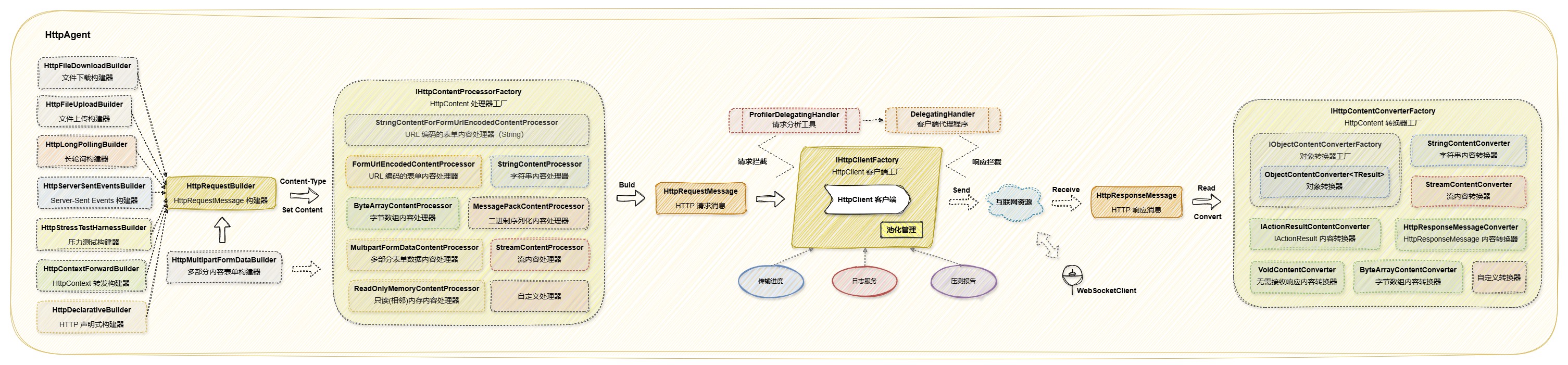
IHttpContentProcessor 用于根据用户设置的原始请求内容和类型构建 HttpContent 实例,并将其设置为 HttpRequestMessage 对象的 Content 属性。如下图所示:
19.6.1 内置内容处理器
StringContentProcessor内容处理器
当原始请求内容满足以下条件时,将使用 StringContentProcessor 来构建 StringContent 实例:
- 原始请求内容为
StringContent或JsonContent。 - 内容类型包括
application/json、application/json-patch+json、application/xml、application/xml-patch+xml、text/xml、text/html、text/plain以及application/soap+xml,且即使这些类型后附加有charset字符集(例如application/json; charset=utf-8),依然适用。
StringContentProcessor 内容处理器默认采用 JsonSerializerOptions.Web 配置,该配置提供了一套适用于 Web 场景的默认序列化设置。如需了解该配置的详细信息,请查阅官方文档:JsonSerializerOptions 的 Web 默认值。
若需自定义这些 JSON 序列化选项,可通过以下方式在 HttpRemote 服务配置中进行调整:
services.AddHttpRemote(builder => {})
    .ConfigureOptions(options =>
    {
        // 自定义 JSON 序列化行为,例如忽略空值
        options.JsonSerializerOptions.DefaultIgnoreCondition = JsonIgnoreCondition.WhenWritingNull;
    });
在上述代码中,通过 ConfigureOptions 方法,您可以灵活地调整 JsonSerializerOptions 的各项设置,以满足特定的序列化需求。
StreamContentProcessor内容处理器
当原始请求内容满足以下条件时,将使用 StreamContentProcessor 来构建 StreamContent 实例:
- 原始请求内容为
StreamContent或Stream。
ByteArrayContentProcessor内容处理器
当原始请求内容满足以下条件时,将使用 ByteArrayContentProcessor 来构建 ByteArrayContent 实例:
- 原始请求内容为
ByteArrayContent或byte[],且不为FormUrlEncodedContent和StringContent。
FormUrlEncodedContentProcessor内容处理器
当原始请求内容满足以下条件时,将使用 FormUrlEncodedContentProcessor 来构建 FormUrlEncodedContent 实例:
- 原始请求内容为
FormUrlEncodedContent。 - 内容类型为
application/x-www-form-urlencoded,且即使类型后附加有charset字符集(例如application/x-www-form-urlencoded; charset=utf-8),依然适用。
StringContentForFormUrlEncodedContentProcessor内容处理器
当原始请求内容满足以下条件时,将使用 StringContentForFormUrlEncodedContentProcessor 来构建内容类型为 application/x-www-form-urlencoded 的 StringContent 实例:
- 原始请求内容为
FormUrlEncodedContent。 - 内容类型为
application/x-www-form-urlencoded,且即使类型后附加有charset字符集(例如application/x-www-form-urlencoded; charset=utf-8),依然适用。 useStringContent参数或UseStringContent属性 为true。
StringContentForFormUrlEncodedContentProcessor 派生自 FormUrlEncodedContentProcessor。
ReadOnlyMemoryContentProcessor内容处理器
当原始请求内容满足以下条件时,将使用 ReadOnlyMemoryContentProcessor 来构建 ReadOnlyMemoryContent 实例:
- 原始请求内容为
ReadOnlyMemoryContent或ReadOnlyMemory<byte>。
MultipartFormDataContentProcessor内容处理器
当原始请求内容满足以下条件时,将使用 MultipartFormDataContentProcessor 来构建 MultipartFormDataContent 实例:
- 原始请求内容为
MultipartFormDataContent。 - 内容类型为
multipart/form-data,且即使类型后附加有charset字符集(例如multipart/form-data; charset=utf-8),依然适用。
MessagePackContentProcessor内容处理器
当原始请求内容满足以下条件时,将使用 MessagePackContentProcessor 来构建 ByteArrayContent 实例:
- 内容类型为
application/msgpack,且即使类型后附加有charset字符集(例如application/msgpack; charset=utf-8),依然适用。
19.6.2 IHttpContentProcessorFactory 内容处理器工厂
IHttpContentProcessorFactory 内容处理器工厂负责根据原始请求的内容和类型,确定合适的 IHttpContentProcessor 内容处理器,并调用其 Process 方法来生成 HttpContent 实例。该工厂服务被配置为单例模式,以确保其在应用程序生命周期中的唯一性和稳定性。
如果未找到合适的 IHttpContentProcessor 内容处理器,将引发 InvalidOperationException 异常,异常信息如下:
No processor found that can handle the content type `application/pdf` and the provided raw content of type `System.Span`1[T]`. Please ensure that the correct content type is specified and that a suitable processor is registered.
以下是使用 IHttpContentProcessorFactory 内容处理器工厂与 HttpClient 结合的示例,展示了如何通过其 Build 方法轻松构建合适的 HttpContent 内容。根据之前的章节说明,当内容类型为 application/json 时,将使用 StringContentProcessor 处理器,并生成 StringContent 实例。
public class YourService(IHttpContentProcessorFactory httpContentProcessorFactory)  // .NET8+ 支持主构造函数注入
{
    public async Task<string> GetStringAsync()
    {
        var httpRequestMessage = new HttpRequestMessage(HttpMethod.Post, "https://furion.net/");

        // 调用 Build 方法构建 HttpContent 实例,实例具体类型为 StringContent
        var httpContent = httpContentProcessorFactory.Build(new { id = 1, name = "Furion" }, "application/json");
        httpRequestMessage.Content = httpContent;

        using var httpClient = new HttpClient();
        var httpResponseMessage = await httpClient.SendAsync(httpRequestMessage);

        return await httpResponseMessage.Content.ReadAsStringAsync();
    }
}
IHttpContentProcessorFactory 工厂会按照最后新增的内容处理器开始查找合适的 IHttpContentProcessor。一旦某个内容处理器的 CanProcess 方法返回 true,即表示找到匹配的内容处理器,随后将使用该处理器来构建 HttpContent。
19.6.3 自定义内容处理器(如序列化)
在特定场景下,当框架内置的 IHttpContentProcessor 内容处理器无法满足需求时,可以通过自定义 IHttpContentProcessor 内容处理器来解决。
如果您希望替换框架默认的 System.Text.Json 序列化提供程序,例如使用 Newtonsoft.Json 来为 application/json 内容类型添加特定的序列化配置选项,那么您可以通过实现 IHttpContentProcessor 接口来满足这一自定义需求。
但请注意,除非有充分的理由,否则通常建议使用 System.Text.Json,因为它与 .NET Core 紧密集成,且性能优异。
若需自定义这些 JSON 序列化选项,可通过以下方式在 HttpRemote 服务配置中进行调整:
services.AddHttpRemote(builder => {})
    .ConfigureOptions(options =>
    {
        // 自定义 JSON 序列化行为,例如忽略空值
        options.JsonSerializerOptions.DefaultIgnoreCondition = JsonIgnoreCondition.WhenWritingNull;
    });
public class CustomStringContentProcessor : HttpContentProcessorBase
{
    public override bool CanProcess(object? rawContent, string contentType) =>
        contentType == "application/json";

    public override HttpContent? Process(object? rawContent, string contentType, Encoding? encoding)
    {
        if (TryProcess(rawContent, contentType, encoding, out var httpContent))
        {
            return httpContent;
        }

        var content = rawContent is string or JsonElement
            ? rawContent.ToString()
            : JsonConvert.SerializeObject(rawContent, new JsonSerializerOptions());    // 自定义序列化程序

        var stringContent = new StringContent(content!, encoding,
            new MediaTypeHeaderValue(contentType) { CharSet = encoding?.BodyName ?? "utf-8" });

        return stringContent;
    }
}
接下来,可以通过以下两种方式应用自定义内容处理器:
- 单次请求设置:
HttpRequestBuilder.Post("https://furion.net/")
    .AddHttpContentProcessors(() => [ new CustomStringContentProcessor() ])
    .SetJsonContent(new { id = 1, name = "Furion" });
- 全局配置:
在 Startup.cs 或 Program.cs 文件中,配置并注册 HttpRemote 服务,以启用自定义内容处理器功能:
services.AddHttpRemote(builder =>
{
    builder.AddHttpContentProcessors(() => [ new CustomStringContentProcessor() ]);
});
HttpContentProcessorBase 基类内置了一个 ServiceProvider 属性,该属性允许您轻松解析并获取通过依赖注入(DI)注册的服务。
要了解更多关于自定义 IHttpContentProcessor 内容处理器的信息,请访问 HttpAgent 官方仓库 进行查阅。
19.6.4 添加 MessagePack 支持
MessagePack 是一种紧凑、高效的二进制序列化格式,专为多种语言间的数据交换设计。相较于 JSON,MessagePack 提供了更高的性能和更小的数据体积。尽管是二进制格式,MessagePack 在设计时便充分考虑了跨语言使用的便捷性,目前已被广泛应用于 Python、Ruby、JavaScript、C++ 以及 C# 等多种编程语言中。
要在项目中启用 MessagePack 支持,请按照以下步骤操作:
- 安装
MessagePack包:
dotnet add package MessagePack
- 添加
MessagePackContentProcessor内容处理器:
public class MessagePackContentProcessor : HttpContentProcessorBase
{
    /// <inheritdoc />
    public override bool CanProcess(object? rawContent, string contentType) =>
        contentType == "application/msgpack";

    /// <inheritdoc />
    public override HttpContent? Process(object? rawContent, string contentType, Encoding? encoding)
    {
        // 尝试解析 HttpContent 类型
        if (TryProcess(rawContent, contentType, encoding, out var httpContent))
        {
            return httpContent;
        }

        // 将原始请求内容转换为字节数组
        var content = rawContent as byte[] ?? MessagePackSerializer.Serialize(rawContent);

        // 初始化 ByteArrayContent 实例
        var byteArrayContent = new ByteArrayContent(content);
        byteArrayContent.Headers.ContentType = new MediaTypeHeaderValue(contentType)
        {
            CharSet = encoding?.BodyName
        };

        return byteArrayContent;
    }
}
- 应用
MessagePackContentProcessor内容处理器:
- 单次请求设置:
HttpRequestBuilder.Post("https://furion.net/")
    .AddHttpContentProcessors(() => [ new MessagePackContentProcessor() ])
    .SetContent(new MessagePackModel { Id = 1, Name = "Furion" }, "application/msgpack");
为使用 MessagePack 序列化,您的模型类需要添加 MessagePackObject 特性,并为属性添加 MessagePack.Key 特性。详细文档请参考 MessagePack-CSharp 官方仓库。
[MessagePackObject]
public class MessagePackModel
{
    [MessagePack.Key(0)]
    public int Id { get; set; }

    [MessagePack.Key(1)]
    public string? Name { get; set; }
}
- 全局配置:
在 Startup.cs 或 Program.cs 文件中,配置并注册 HttpRemote 服务,以启用 MessagePackContentProcessor 内容处理器功能:
services.AddHttpRemote(builder =>
{
    builder.AddHttpContentProcessors(() => [ new MessagePackContentProcessor() ]);
});
这样可以在项目中通过 HTTP 远程请求发送 application/msgpack 格式的数据。
系统默认内置了 MessagePackContentProcessor 内容处理器,只需在项目中安装 MessagePack 包即可启用。不过,请注意,内置的 MessagePackContentProcessor 是通过反射创建的,可能会带来一定的性能损耗。
如果对性能有极高要求,可以考虑使用上述自定义方式实现;否则,直接使用框架内置的处理器即可。
19.6.5 添加 Protobuf 支持
Protobuf(Protocol Buffers)是 Google 开发的一种语言中立、平台中立、可扩展的序列化结构数据格式,用于通信协议、数据存储等。
要在项目中启用 Protobuf 支持,请按照以下步骤操作:
- 安装
protobuf-net包:
dotnet add protobuf-net
- 添加
ProtobufContentProcessor内容处理器:
public class ProtobufContentProcessor : HttpContentProcessorBase
{
    /// <inheritdoc />
    public override bool CanProcess(object? rawContent, string contentType) =>
        contentType == "application/x-protobuf";

    /// <inheritdoc />
    public override HttpContent? Process(object? rawContent, string contentType, Encoding? encoding)
    {
        // 尝试解析 HttpContent 类型
        if (TryProcess(rawContent, contentType, encoding, out var httpContent))
        {
            return httpContent;
        }

        byte[] content;
        if (rawContent is byte[] bytes)
        {
            content = bytes;
        }
        else
        {
            // 将原始请求内容转换为字节数组
            using var ms = new MemoryStream();
            Serializer.Serialize(ms, rawContent);
            content = ms.ToArray();
        }

        // 初始化 ByteArrayContent 实例
        var byteArrayContent = new ByteArrayContent(content);
        byteArrayContent.Headers.ContentType = new MediaTypeHeaderValue(contentType) { CharSet = encoding?.BodyName };

        return byteArrayContent;
    }
}
- 应用
ProtobufContentProcessor内容处理器:
- 单次请求设置:
HttpRequestBuilder.Post("https://furion.net/")
    .AddHttpContentProcessors(() => [ new ProtobufContentProcessor() ])
    .SetContent(new MyProtobufMessage { Id = 1, Name = "Furion" }, "application/x-protobuf");
要使用 protobuf-net 进行序列化,您的模型类需添加 ProtoContract 特性,并且其属性需添加 ProtoMember 特性。详细文档请查阅 protobuf-net 官方仓库。不过,类型通常是通过 .proto 文件来定义并生成的:
- 定义
my_message.proto文件如下:
syntax = "proto3"; // 指定使用 proto3 语法

package mynamespace; // 可选:定义包名(对应 C# 的命名空间)

// 定义 MyProtobufMessage 消息类型
message MyProtobufMessage {
  int32 id = 1;     // 整数字段,标签号为 1
  string name = 2;  // 字符串字段,标签号为 2
}
- 使用
Google.Protobuf命令行工具生成对应的C#类,命令如下:
protoc -I=./ --csharp_out=./Generated ./my_message.proto
生成的 C# 类可能类似于以下形式(已添加 ProtoContract 和 ProtoMember 特性):
[ProtoContract]
public class MyProtobufMessage
{
    [ProtoMember(1)]
    public int Id { get; set; }

    [ProtoMember(2)]
    public string Name { get; set; }
}
- 全局配置:
在 Startup.cs 或 Program.cs 文件中,配置并注册 HttpRemote 服务,以启用 ProtobufContentProcessor 内容处理器功能:
services.AddHttpRemote(builder =>
{
    builder.AddHttpContentProcessors(() => [ new ProtobufContentProcessor() ]);
});
这样可以在项目中通过 HTTP 远程请求发送 application/x-protobuf 格式的数据。
19.7 IHttpContentConverter 内容转换器
IHttpContentConverter 用于将 HTTP 远程请求返回的 HttpResponseMessage 对象转换成目标类型。如下图所示:
19.7.1 内置内容转换器
StringContentConverter内容转换器
当目标接收类型为字符串时,将使用 StringContentConverter 来将 HttpResponseMessage 对象转换为字符串。该转换过程内部调用了 HttpResponseMessage.Content 提供的 ReadAsStringAsync 方法来实现。
StreamContentConverter内容转换器
当目标接收类型为 Stream 时,将使用 StreamContentConverter 来将 HttpResponseMessage 对象转换为 Stream。该转换过程内部调用了 HttpResponseMessage.Content 提供的 ReadAsStreamAsync 方法来实现。
ByteArrayContentConverter内容转换器
当目标接收类型为字节数组时,将使用 ByteArrayContentConverter 来将 HttpResponseMessage 对象转换为字节数组。该转换过程内部调用了 HttpResponseMessage.Content 提供的 ReadAsByteArrayAsync 方法来实现。
HttpResponseMessageConverter内容转换器
当目标接收类型为 HttpResponseMessage 时,将使用 HttpResponseMessageConverter 来将 HttpResponseMessage 对象直接返回。
VoidContentConverter内容转换器
当目标接收类型为 void 或 VoidContent 时,将使用 VoidContentConverter 来返回空值(无返回值)。
IActionResultContentConverter内容转换器
当目标接收类型为 IActionResult 时,将使用 IActionResultContentConverter 来将 HttpResponseMessage 对象转换为 IActionResultContentConverter。
ObjectContentConverter内容转换器
当目标接收类型不为特定类型,例如自定义类型、基本数据类型(如 int、bool 等)在内的多种类型,将使用 ObjectContentConverter 来将 HttpResponseMessage 对象转换为目标接收类型。该转换过程内部调用了 HttpResponseMessage.Content 提供的 ReadFromJsonAsync 方法来实现。
19.7.2 IHttpContentConverterFactory 内容转换器工厂
IHttpContentConverterFactory 内容转换器工厂负责根据目标接收类型,确定合适的 IHttpContentConverter 内容转换器,并调用其 Read 方法来将 HttpResponseMessage 对象转换为目标接收类型。该工厂服务被配置为单例模式,以确保其在应用程序生命周期中的唯一性和稳定性。
如果未找到匹配的 IHttpContentConverter 内容处理器,系统会回退到使用 IObjectContentConverterFactory 对象内容转换器工厂来进行转换,其内部通过返回 ObjectContentConverter() 实例进行转换。
以下是使用 IHttpContentConverterFactory 内容转换器工厂与 HttpClient 结合的示例,展示了如何通过其 Read 方法轻松将 HttpResponseMessage 对象转换为目标类型实例。
public class YourService(IHttpContentConverterFactory httpContentConverterFactory)  // .NET8+ 支持主构造函数注入
{
    public async Task<string> GetStringAsync()
    {
        var httpRequestMessage = new HttpRequestMessage(HttpMethod.Post, "https://furion.net/");

        using var httpClient = new HttpClient();
        var httpResponseMessage = await httpClient.SendAsync(httpRequestMessage);

        // 调用 Read 方法将 HttpResponseMessage 对象转换为目标类型实例
        return await httpContentConverterFactory.ReadAsync<string>(httpResponseMessage);
    }
}
IHttpContentConverterFactory 工厂会按照最后新增的内容转换器开始查找目标接收类型匹配的 IHttpContentConverter<TResult>。一旦某个内容处理器的泛型类型与目标接收类型相同,即表示找到匹配的内容转换器,随后将使用该转换器来读取目标类型实例。
19.7.3 IObjectContentConverterFactory 对象内容转换器工厂
当 IHttpContentConverterFactory 内容转换器工厂未找到匹配的 IHttpContentConverter 内容处理器,系统会回退到使用 IObjectContentConverterFactory 对象内容转换器工厂来进行转换,其内部通过返回 ObjectContentConverter() 实例进行转换。该工厂服务被配置为单例模式,以确保其在应用程序生命周期中的唯一性和稳定性。
以下是使用 IObjectContentConverterFactory 内容转换器工厂与 HttpClient 结合的示例,展示了如何通过其 Read 方法轻松将 HttpResponseMessage 对象转换为目标类型实例。
public class YourService(IObjectContentConverterFactory objectContentConverterFactory)  // .NET8+ 支持主构造函数注入
{
    public async Task<string> GetStringAsync()
    {
        var httpRequestMessage = new HttpRequestMessage(HttpMethod.Post, "https://furion.net/getuser/100");

        using var httpClient = new HttpClient();
        var httpResponseMessage = await httpClient.SendAsync(httpRequestMessage);

        // 调用 GetConverter<TResult>(httpResponseMessage) 方法获取对象内容转换器实例
        // 随后调用 Read 方法将 HttpResponseMessage 对象转换为目标类型实例
        return await objectContentConverterFactory.GetConverter<string>(httpResponseMessage).ReadAsync<string>(httpResponseMessage);
    }
}
若需手动将 HttpResponseMessage 对象转换为目标接收类型,建议使用 IHttpContentConverterFactory 内容转换器工厂,因为它内部默认调用了 IObjectContentConverterFactory。
19.7.4 自定义对象内容转换器(如序列化)
IObjectContentConverterFactory 默认的内容转换器工厂会返回 ObjectContentConverter 实例,该实例利用 HttpResponseMessage.Content 的 ReadFromJsonAsync 方法,结合 System.Text.Json 序列化库,将 HttpRequestMessage 对象转换为目标接收类型。然而,这种转换方式在某些特殊类型(例如 DataTable)上可能会遇到反序列化失败的问题。为了应对这种情况,您可以自定义 ObjectContentConverter,以便选择或更换为更适合您需求的 JSON 序列化工具(例如 Newtonsoft.Json)。
但请注意,除非有充分的理由,否则通常建议使用 System.Text.Json,因为它与 .NET Core 紧密集成,且性能优异。
若需自定义这些 JSON 序列化选项,可通过以下方式在 HttpRemote 服务配置中进行调整:
services.AddHttpRemote(builder => {})
    .ConfigureOptions(options =>
    {
        // 自定义 JSON 序列化行为,例如忽略空值
        options.JsonSerializerOptions.DefaultIgnoreCondition = JsonIgnoreCondition.WhenWritingNull;
    });
自定义时需同时提供泛型和非泛型版本:
// 非泛型版本
public class CustomObjectContentConverter : ObjectContentConverter
{
    /// <inheritdoc />
    public override object? Read(Type resultType, HttpResponseMessage httpResponseMessage,
        CancellationToken cancellationToken = default)
    {
        // 根据 HTTP 响应消息和服务提供器,解析出 HttpClient 客户端对应的 JSON 响应反序列化时的上下文信息
        var jsonSerializationContext =
            HttpRemoteUtility.ResolveJsonSerializationContext(resultType, httpResponseMessage, ServiceProvider);

        // 获取 JSON 反序列化的值(若需使用 Newtonsoft.Json 进行序列化或反序列化操作,请将以下代码替换为 Newtonsoft.Json 库的相应方法调用) ✅✅✅
        var deserializedValue = httpResponseMessage.Content.ReadFromJsonAsync(jsonSerializationContext.ResultType,
            jsonSerializationContext.JsonSerializerOptions, cancellationToken).GetAwaiter().GetResult();

        // 获取转换的目标类型值
        return jsonSerializationContext.GetResultValue(deserializedValue);
    }

    /// <inheritdoc />
    public override async Task<object?> ReadAsync(Type resultType, HttpResponseMessage httpResponseMessage,
        CancellationToken cancellationToken = default)
    {
        // 根据 HTTP 响应消息和服务提供器,解析出 HttpClient 客户端对应的 JSON 响应反序列化时的上下文信息
        var jsonSerializationContext =
            HttpRemoteUtility.ResolveJsonSerializationContext(resultType, httpResponseMessage, ServiceProvider);

        // 获取 JSON 反序列化的值(若需使用 Newtonsoft.Json 进行序列化或反序列化操作,请将以下代码替换为 Newtonsoft.Json 库的相应方法调用) ✅✅✅
        var deserializedValue = await httpResponseMessage.Content.ReadFromJsonAsync(jsonSerializationContext.ResultType,
            jsonSerializationContext.JsonSerializerOptions, cancellationToken);

        // 获取转换的目标类型值
        return jsonSerializationContext.GetResultValue(deserializedValue);
    }
}

// 泛型版本
public class CustomObjectContentConverter<TResult> : CustomObjectContentConverter, IHttpContentConverter<TResult>
{
    /// <inheritdoc />
    public virtual TResult? Read(HttpResponseMessage httpResponseMessage,
        CancellationToken cancellationToken = default) =>
        (TResult?)base.Read(typeof(TResult), httpResponseMessage, cancellationToken);

    /// <inheritdoc />
    public virtual async Task<TResult?> ReadAsync(HttpResponseMessage httpResponseMessage,
        CancellationToken cancellationToken = default) =>
        (TResult?)await base.ReadAsync(typeof(TResult), httpResponseMessage, cancellationToken);
}
接着,创建自定义的 IObjectContentConverterFactory 实现:
public sealed class CustomObjectContentConverterFactory : IObjectContentConverterFactory
{
    /// <inheritdoc />
    public IHttpContentConverter<TResult> GetConverter<TResult>(HttpResponseMessage httpResponseMessage)
    {
        // 检查 HTTP 响应的内容类型是否为 XML 媒体类型
        if (httpResponseMessage.IsXmlContent())
        {
            return new XmlObjectContentConverter<TResult>();
        }

        return new CustomObjectContentConverter<TResult>();
    }

    /// <inheritdoc />
    public IHttpContentConverter GetConverter(Type resultType, HttpResponseMessage httpResponseMessage)
    {
        // 检查 HTTP 响应的内容类型是否为 XML 媒体类型
        if (httpResponseMessage.IsXmlContent())
        {
            return new XmlObjectContentConverter();
        }

        return new CustomObjectContentConverter();
    }
}
最后,在 Startup.cs 或 Program.cs 文件中,配置并注册 HttpRemote 服务,以替换默认的对象内容转换器工厂功能:
services.AddHttpRemote(builder =>
{
    builder.UseObjectContentConverterFactory<CustomObjectContentConverterFactory>();
});
这样,通过自定义的 ObjectContentConverter 和 IObjectContentConverterFactory 工厂,可以确保在反序列化时使用指定的 JSON 选项,避免潜在的反序列化问题。
ObjectContentConverter 和 ObjectContentConverter<T> 基类内置了一个 ServiceProvider 属性,该属性允许您轻松解析并获取通过依赖注入(DI)注册的服务。
19.7.5 自定义内容转换器
在特定场景下,当框架内置的 IHttpContentConverter 内容转换器无法满足需求时,可以通过自定义 IHttpContentConverter 内容转换器来解决。
例如,为 Span<char> 类型添加内容转换器,可以通过实现 IHttpContentConverter 接口来实现自定义需求。
public class SpanCharContentConverter : HttpContentConverterBase<Span<char>>
{
    /// <inheritdoc />
    public override Span<char>? Read(HttpResponseMessage httpResponseMessage,
        CancellationToken cancellationToken = default)
    {
        var str = httpResponseMessage.Content.ReadAsStringAsync(cancellationToken).GetAwaiter().GetResult();

        return str.AsSpan();
    }

    /// <inheritdoc />
    public override async Task<Span<char>?> ReadAsync(HttpResponseMessage httpResponseMessage,
        CancellationToken cancellationToken = default)
    {
        var str = await httpResponseMessage.Content.ReadAsStringAsync(cancellationToken);

        return str.AsSpan();
    }
}
接下来,可以通过以下两种方式应用自定义内容转换器器:
- 单次请求设置:
HttpRequestBuilder.Post("https://furion.net/")
    .AddHttpContentConverters(() => [ new SpanCharContentConverter() ]);
- 全局配置:
在 Startup.cs 或 Program.cs 文件中,配置并注册 HttpRemote 服务,以启用自定义内容转换器功能:
services.AddHttpRemote(builder =>
{
    builder.AddHttpContentConverters(() => [ new SpanCharContentConverter() ]);
});
以下示例展示了如何在发送 HTTP 远程请求时使用 SpanCharContentConverter 内容转换器:
使用 IHttpRemoteService 方式:
// 单次请求添加
var span = await httpRemoteService.SendAsAsync<Span<char>>(HttpRequestBuilder.Post("https://furion.net/")
    .AddHttpContentConverters(() => [ new SpanCharContentConverter() ]));

// 全局配置
var span = await httpRemoteService.GetAsAsync<Span<char>>("https://furion.net/");
使用 IHttpContentConverterFactory 方式:
public class YourService(IHttpContentConverterFactory httpContentConverterFactory)  // .NET8+ 支持主构造函数注入
{
    public async Task GetStringAsync()
    {
        var httpRequestMessage = new HttpRequestMessage(HttpMethod.Post, "https://furion.net/");

        using var httpClient = new HttpClient();
        var httpResponseMessage = await httpClient.SendAsync(httpRequestMessage);

        // 调用 Read 方法将 HttpResponseMessage 对象转换为目标类型实例
        var span =  await httpContentConverterFactory.ReadAsync<Span<char>>(httpResponseMessage);
    }
}
HttpContentConverterBase<T> 基类内置了一个 ServiceProvider 属性,该属性允许您轻松解析并获取通过依赖注入(DI)注册的服务。
要了解更多关于自定义 IHttpContentConverter 内容处理器的信息,请访问 HttpAgent 官方仓库 进行查阅。
19.8 IHttpRemoteService 服务 ✨
IHttpRemoteService 是一个用于发送 HTTP 远程请求的入口服务,它构成了 HTTP 远程请求模块的核心。简而言之,当需要发送 HTTP 远程请求时,应使用已注入的 IHttpRemoteService 服务。该服务默认以单例模式注册,因此可以在任何生存周期的服务中安全地使用。
在使用 IHttpRemoteService 服务前,需在 Startup.cs 或 Program.cs 文件中注册并配置 HttpRemote 服务。
// 在 Startup.cs 中注册:
services.AddHttpRemote();

// 在 Program.cs 中,注册方式如下:
// builder.Services.AddHttpRemote();
若遇到 AddHttpRemote 方法的二义性错误,可通过为其添加一个空的委托参数来解决,示例如下:
services.AddHttpRemote(builder => {});
随后,在您的服务、控制器或任何支持依赖注入的类中,注入 IHttpRemoteService 服务。
public class YourService
{
    private readonly IHttpRemoteService _httpRemoteService;

    public YourService(IHttpRemoteService httpRemoteService)
    {
        _httpRemoteService = httpRemoteService;
    }
}
若您使用的是 .NET 8 及以上版本时,可通过主构造函数注入简化代码:
public class YourService(IHttpRemoteService httpRemoteService)
{
    // 使用 httpRemoteService 变量
}
或者,您也可以在特定方法中按需注入:
public class YourService
{
    public Task<string> GetResource([FromServices] IHttpRemoteService httpRemoteService)
    {
        // 您的代码逻辑
    }
}
在 .NET Core 中,推荐使用依赖注入控制反转的方式来构建应用项目。因此,建议尽可能采用依赖注入的方式构建您的应用。然而,在某些特殊场景(如静态类中),依赖注入可能无法直接使用。此时,您可以采用以下方式获取服务:
var httpRemoteService = App.GetRequiredService<IHttpRemoteService>();
请注意,这种方式应作为依赖注入的补充,而非替代。在可能的情况下,仍应优先考虑使用依赖注入来构建和管理应用中的服务。
19.8.1 HttpRemoteBuilder 构建器
HttpRemoteBuilder 是一个构建器,用于配置和构建 IHttpRemoteService 服务所需的所有设置。在应用启动时,通常通过调用 services.AddHttpRemote 方法来指定这些配置。
以下展示了 HttpRemoteBuilder 提供的所有配置功能:
services.AddHttpRemote(builder =>
{
    // 添加自定义内容处理器
    builder.AddHttpContentProcessors(() => [ new CustomStringContentProcessor() ]);

    // 添加自定义内容转换器
    builder.AddHttpContentConverters(() => [ new SpanCharContentConverter() ]);

    // 设置自定义对象内容转换器工厂
    builder.UseObjectContentConverterFactory<CustomObjectContentConverterFactory>();
    builder.UseObjectContentConverterFactory(typeof(CustomObjectContentConverterFactory));

    // 添加 HTTP 声明式服务
    builder.AddHttpDeclarative<IHttpService>();
    builder.AddHttpDeclarative(typeof(IHttpService));

    // 批量添加 HTTP 声明式服务
    builder.AddHttpDeclaratives([typeof(IHttpService), typeof(IHttpService2), ...]);

    // 扫描程序集批量添加 HTTP 声明式服务
    builder.AddHttpDeclarativesFromAssemblies([ assembly1, assembly2, ... ]);  // 若使用 Furion 框架可直接设置 App.Assemblies

    // 添加自定义 HTTP 声明式提取器
    builder.AddHttpDeclarativeExtractors(() => [ new AcceptDeclarativeExtractor() ]);

    // 扫描程序集批量添加 HTTP 声明式提取器
    builder.AddHttpDeclarativeExtractorsFromAssemblies([ assembly1, assembly2, ... ]); // 若使用 Furion 框架可直接设置 App.Assemblies
});
19.8.2 HttpRemoteOptions 配置选项
使用 services.AddHttpRemote() 方法添加 HTTP 远程请求服务时,会返回一个 IHttpRemoteBuilder 实例。通过该实例,可以访问并配置 HttpRemoteOptions,这些配置包括默认请求内容类型、JSON 序列化设置等属性:
services.AddHttpRemote(builder => {})
    .ConfigureOptions(options =>
    {
        // 配置默认的请求内容类型
        options.DefaultContentType = "text/plain";  // 推荐配置为 "application/json"

        // 设置文件下载的默认保存路径
        options.DefaultFileDownloadDirectory = @"C:\Workspaces\";

        // 设置请求分析工具日志级别,默认 Warning
        options.ProfilerLogLevel = LogLevel.Warning;

        // 设置指示请求是否应遵循重定向响应,默认 true
        options.AllowAutoRedirect = true;

        // 设置请求所遵循的最大重定向数,默认 50 次
        options.MaximumAutomaticRedirections = 50;

        // 设置回退请求基地址,当未配置 HttpClient 的 BaseAddress 且请求地址为相对地址时有效
        options.FallbackBaseAddress = new Uri("https://localhost:5000");

        // 自定义 JSON 序列化选项
        options.JsonSerializerOptions.DefaultIgnoreCondition = JsonIgnoreCondition.WhenWritingNull;

        // 设置用于替换 URL 地址中配置模板参数的提供源
        options.Configuration = builder.Configuration;  // 若使用 Furion 框架可直接设置 App.Configuration

        // 设置 URL 参数格式化程序
        options.UrlParameterFormatter = new UrlParameterFormatter();

        // 未注册日志服务时的备用日志输出委托
        options.FallbackLogger = Console.WriteLine; // 可替换为 Debug.WriteLine

        // 设置 HttpRequestBuilder 统一配置器
        options.HttpRequestBuilderConfigurer = null;    // 默认为 null
    });
ConfigureOptions 方法允许对 HTTP 远程请求服务进行更多自定义配置,例如调整 JSON 序列化行为等。此外,ConfigureOptions 还提供了支持服务解析的重载方法。示例如下:
services.AddHttpRemote(builder => {})
    .ConfigureOptions((options, serviceProvider) =>
    {
        // 解析所需服务
        var yourService = serviceProvider.GetRequiredService<IYourService>();

        // 其他配置代码
    });
19.8.3 统一配置 HttpClient 客户端
在应用项目开发中,通常需要对所有的 HttpClient 客户端实例进行统一配置。为此,框架提供了 ConfigureHttpClientDefaults 方法,支持一键配置:
services.ConfigureHttpClientDefaults(clientBuilder =>
{
    clientBuilder.ConfigurePrimaryHttpMessageHandler(() => new HttpClientHandler());
});

// 或者使用 IHttpRemoteBuilder 扩展方法进行一键配置
services.AddHttpRemote()
    .ConfigureHttpClientDefaults(clientBuilder =>
    {
        clientBuilder.ConfigurePrimaryHttpMessageHandler(() => new HttpClientHandler());
    });
通过这种方式,可以轻松地为所有 HttpClient 实例设置默认的 HttpMessageHandler,确保配置的一致性和可维护性。
19.8.4 内置属性和方法
IHttpRemoteService 服务类型包含多个属性以及丰富多样的方法。
内置属性
// 获取 HTTP 远程请求选项,返回值类型为 HttpRemoteOptions
var remoteOptions = httpRemoteService.RemoteOptions;

// 获取 IServiceProvider 接口实例
var serviceProvider = httpRemoteService.ServiceProvider;
remoteOptions 参数的类型为 HttpRemoteOptions,包含以下属性和方法:
- 属性:
DefaultContentType:默认请求内容类型(string类型)。DefaultFileDownloadDirectory:默认文件下载保存目录(string类型)。HttpDeclarativeExtractors:自定义HTTP声明式提取器集合(IReadOnlyList<Func<IEnumerable<IHttpDeclarativeExtractor>>>类型)。
内置方法
- 核心方法:
// 返回 HttpResponseMessage 对象
httpRemoteService.Send(httpRequestBuilder, cancellationToken);
httpRemoteService.Send(httpRequestBuilder, HttpCompletionOption.ResponseContentRead, cancellationToken);
await httpRemoteService.SendAsync(httpRequestBuilder, cancellationToken);
await httpRemoteService.SendAsync(httpRequestBuilder, HttpCompletionOption.ResponseContentRead, cancellationToken);

// 返回目标 T 类型
httpRemoteService.SendAs<T>(httpRequestBuilder, cancellationToken);
httpRemoteService.SendAs<T>(httpRequestBuilder, HttpCompletionOption.ResponseContentRead, cancellationToken);
await httpRemoteService.SendAsAsync<T>(httpRequestBuilder, cancellationToken);
await httpRemoteService.SendAsAsync<T>(httpRequestBuilder, HttpCompletionOption.ResponseContentRead, cancellationToken);

// 返回 HttpRemoteResult<T>
httpRemoteService.Send<T>(httpRequestBuilder, cancellationToken);
httpRemoteService.Send<T>(httpRequestBuilder, HttpCompletionOption.ResponseContentRead, cancellationToken);
await httpRemoteService.SendAsync<T>(httpRequestBuilder, cancellationToken);
await httpRemoteService.SendAsync<T>(httpRequestBuilder, HttpCompletionOption.ResponseContentRead, cancellationToken);

// 返回 object 类型,实际类型为 resultType
httpRemoteService.SendAs(resultType, httpRequestBuilder, cancellationToken);
httpRemoteService.SendAs(resultType, httpRequestBuilder, HttpCompletionOption.ResponseContentRead, cancellationToken);
await httpRemoteService.SendAsAsync(resultType, httpRequestBuilder, cancellationToken);
await httpRemoteService.SendAsAsync(resultType, httpRequestBuilder, HttpCompletionOption.ResponseContentRead, cancellationToken);

// 返回字符串类型
httpRemoteService.SendAsString(httpRequestBuilder, cancellationToken);
httpRemoteService.SendAsString(httpRequestBuilder, HttpCompletionOption.ResponseContentRead, cancellationToken);
await httpRemoteService.SendAsStringAsync(httpRequestBuilder, cancellationToken);
await httpRemoteService.SendAsStringAsync(httpRequestBuilder, HttpCompletionOption.ResponseContentRead, cancellationToken);

// 返回字节数组类型
httpRemoteService.SendAsByteArray(httpRequestBuilder, cancellationToken);
httpRemoteService.SendAsByteArray(httpRequestBuilder, HttpCompletionOption.ResponseContentRead, cancellationToken);
await httpRemoteService.SendAsByteArrayAsync(httpRequestBuilder, cancellationToken);
await httpRemoteService.SendAsByteArrayAsync(httpRequestBuilder, HttpCompletionOption.ResponseContentRead, cancellationToken);

// 返回 Stream 类型
httpRemoteService.SendAsStream(httpRequestBuilder, cancellationToken);
httpRemoteService.SendAsStream(httpRequestBuilder, HttpCompletionOption.ResponseContentRead, cancellationToken);
await httpRemoteService.SendAsStreamAsync(httpRequestBuilder, cancellationToken);
await httpRemoteService.SendAsStreamAsync(httpRequestBuilder, HttpCompletionOption.ResponseContentRead, cancellationToken);
- 请求谓词方法:
// ============ GET ============

// 返回 HttpResponseMessage 对象
httpRemoteService.Get(requestUri, configure, cancellationToken);
httpRemoteService.Get(requestUri, completionOption, configure, cancellationToken);
await httpRemoteService.GetAsync(requestUri, configure, cancellationToken);
await httpRemoteService.GetAsync(requestUri, completionOption, configure, cancellationToken);

// 返回目标 T 类型
httpRemoteService.GetAs<T>(requestUri, configure, cancellationToken);
httpRemoteService.GetAs<T>(requestUri, completionOption, configure, cancellationToken);
await httpRemoteService.GetAsAsync<T>(requestUri, configure, cancellationToken);
await httpRemoteService.GetAsAsync<T>(requestUri, completionOption, configure, cancellationToken);

// 返回 HttpRemoteResult<T>
httpRemoteService.Get<T>(requestUri, configure, cancellationToken);
httpRemoteService.Get<T>(requestUri, completionOption, configure, cancellationToken);
await httpRemoteService.GetAsync<T>(requestUri, configure, cancellationToken);
await httpRemoteService.GetAsync<T>(requestUri, completionOption, configure, cancellationToken);

// 返回字符串类型
httpRemoteService.GetAsString(requestUri, configure, cancellationToken);
httpRemoteService.GetAsString(requestUri, completionOption, configure, cancellationToken);
await httpRemoteService.GetAsStringAsync(requestUri, configure, cancellationToken);
await httpRemoteService.GetAsStringAsync(requestUri, completionOption, configure, cancellationToken);

// 返回字节数组类型
httpRemoteService.GetAsByteArray(requestUri, configure, cancellationToken);
httpRemoteService.GetAsByteArray(requestUri, completionOption, configure, cancellationToken);
await httpRemoteService.GetAsByteArrayAsync(requestUri, configure, cancellationToken);
await httpRemoteService.GetAsByteArrayAsync(requestUri, completionOption, configure, cancellationToken);

// 返回 Stream 类型
httpRemoteService.GetAsStream(requestUri, configure, cancellationToken);
httpRemoteService.GetAsStream(requestUri, completionOption, configure, cancellationToken);
await httpRemoteService.GetAsStreamAsync(requestUri, configure, cancellationToken);
await httpRemoteService.GetAsStreamAsync(requestUri, completionOption, configure, cancellationToken);

// ============ PUT ============

// 返回 HttpResponseMessage 对象
httpRemoteService.Put(requestUri, configure, cancellationToken);
httpRemoteService.Put(requestUri, completionOption, configure, cancellationToken);
await httpRemoteService.PutAsync(requestUri, configure, cancellationToken);
await httpRemoteService.PutAsync(requestUri, completionOption, configure, cancellationToken);

// 返回目标 T 类型
httpRemoteService.PutAs<T>(requestUri, configure, cancellationToken);
httpRemoteService.PutAs<T>(requestUri, completionOption, configure, cancellationToken);
await httpRemoteService.PutAsAsync<T>(requestUri, configure, cancellationToken);
await httpRemoteService.PutAsAsync<T>(requestUri, completionOption, configure, cancellationToken);

// 返回 HttpRemoteResult<T>
httpRemoteService.Put<T>(requestUri, configure, cancellationToken);
httpRemoteService.Put<T>(requestUri, completionOption, configure, cancellationToken);
await httpRemoteService.PutAsync<T>(requestUri, configure, cancellationToken);
await httpRemoteService.PutAsync<T>(requestUri, completionOption, configure, cancellationToken);

// 返回字符串类型
httpRemoteService.PutAsString(requestUri, configure, cancellationToken);
httpRemoteService.PutAsString(requestUri, completionOption, configure, cancellationToken);
await httpRemoteService.PutAsStringAsync(requestUri, configure, cancellationToken);
await httpRemoteService.PutAsStringAsync(requestUri, completionOption, configure, cancellationToken);

// 返回字节数组类型
httpRemoteService.PutAsByteArray(requestUri, configure, cancellationToken);
httpRemoteService.PutAsByteArray(requestUri, completionOption, configure, cancellationToken);
await httpRemoteService.PutAsByteArrayAsync(requestUri, configure, cancellationToken);
await httpRemoteService.PutAsByteArrayAsync(requestUri, completionOption, configure, cancellationToken);

// 返回 Stream 类型
httpRemoteService.PutAsStream(requestUri, configure, cancellationToken);
httpRemoteService.PutAsStream(requestUri, completionOption, configure, cancellationToken);
await httpRemoteService.PutAsStreamAsync(requestUri, configure, cancellationToken);
await httpRemoteService.PutAsStreamAsync(requestUri, completionOption, configure, cancellationToken);

// ============ POST ============

// 返回 HttpResponseMessage 对象
httpRemoteService.Post(requestUri, configure, cancellationToken);
httpRemoteService.Post(requestUri, completionOption, configure, cancellationToken);
await httpRemoteService.PostAsync(requestUri, configure, cancellationToken);
await httpRemoteService.PostAsync(requestUri, completionOption, configure, cancellationToken);

// 返回目标 T 类型
httpRemoteService.PostAs<T>(requestUri, configure, cancellationToken);
httpRemoteService.PostAs<T>(requestUri, completionOption, configure, cancellationToken);
await httpRemoteService.PostAsAsync<T>(requestUri, configure, cancellationToken);
await httpRemoteService.PostAsAsync<T>(requestUri, completionOption, configure, cancellationToken);

// 返回 HttpRemoteResult<T>
httpRemoteService.Post<T>(requestUri, configure, cancellationToken);
httpRemoteService.Post<T>(requestUri, completionOption, configure, cancellationToken);
await httpRemoteService.PostAsync<T>(requestUri, configure, cancellationToken);
await httpRemoteService.PostAsync<T>(requestUri, completionOption, configure, cancellationToken);

// 返回字符串类型
httpRemoteService.PostAsString(requestUri, configure, cancellationToken);
httpRemoteService.PostAsString(requestUri, completionOption, configure, cancellationToken);
await httpRemoteService.PostAsStringAsync(requestUri, configure, cancellationToken);
await httpRemoteService.PostAsStringAsync(requestUri, completionOption, configure, cancellationToken);

// 返回字节数组类型
httpRemoteService.PostAsByteArray(requestUri, configure, cancellationToken);
httpRemoteService.PostAsByteArray(requestUri, completionOption, configure, cancellationToken);
await httpRemoteService.PostAsByteArrayAsync(requestUri, configure, cancellationToken);
await httpRemoteService.PostAsByteArrayAsync(requestUri, completionOption, configure, cancellationToken);

// 返回 Stream 类型
httpRemoteService.PostAsStream(requestUri, configure, cancellationToken);
httpRemoteService.PostAsStream(requestUri, completionOption, configure, cancellationToken);
await httpRemoteService.PostAsStreamAsync(requestUri, configure, cancellationToken);
await httpRemoteService.PostAsStreamAsync(requestUri, completionOption, configure, cancellationToken);

// ============ DELETE ============

// 返回 HttpResponseMessage 对象
httpRemoteService.Delete(requestUri, configure, cancellationToken);
httpRemoteService.Delete(requestUri, completionOption, configure, cancellationToken);
await httpRemoteService.DeleteAsync(requestUri, configure, cancellationToken);
await httpRemoteService.DeleteAsync(requestUri, completionOption, configure, cancellationToken);

// 返回目标 T 类型
httpRemoteService.DeleteAs<T>(requestUri, configure, cancellationToken);
httpRemoteService.DeleteAs<T>(requestUri, completionOption, configure, cancellationToken);
await httpRemoteService.DeleteAsAsync<T>(requestUri, configure, cancellationToken);
await httpRemoteService.DeleteAsAsync<T>(requestUri, completionOption, configure, cancellationToken);

// 返回 HttpRemoteResult<T>
httpRemoteService.Delete<T>(requestUri, configure, cancellationToken);
httpRemoteService.Delete<T>(requestUri, completionOption, configure, cancellationToken);
await httpRemoteService.DeleteAsync<T>(requestUri, configure, cancellationToken);
await httpRemoteService.DeleteAsync<T>(requestUri, completionOption, configure, cancellationToken);

// 返回字符串类型
httpRemoteService.DeleteAsString(requestUri, configure, cancellationToken);
httpRemoteService.DeleteAsString(requestUri, completionOption, configure, cancellationToken);
await httpRemoteService.DeleteAsStringAsync(requestUri, configure, cancellationToken);
await httpRemoteService.DeleteAsStringAsync(requestUri, completionOption, configure, cancellationToken);

// 返回字节数组类型
httpRemoteService.DeleteAsByteArray(requestUri, configure, cancellationToken);
httpRemoteService.DeleteAsByteArray(requestUri, completionOption, configure, cancellationToken);
await httpRemoteService.DeleteAsByteArrayAsync(requestUri, configure, cancellationToken);
await httpRemoteService.DeleteAsByteArrayAsync(requestUri, completionOption, configure, cancellationToken);

// 返回 Stream 类型
httpRemoteService.DeleteAsStream(requestUri, configure, cancellationToken);
httpRemoteService.DeleteAsStream(requestUri, completionOption, configure, cancellationToken);
await httpRemoteService.DeleteAsStreamAsync(requestUri, configure, cancellationToken);
await httpRemoteService.DeleteAsStreamAsync(requestUri, completionOption, configure, cancellationToken);

// ============ HEAD ============

// 返回 HttpResponseMessage 对象
httpRemoteService.Head(requestUri, configure, cancellationToken);
httpRemoteService.Head(requestUri, completionOption, configure, cancellationToken);
await httpRemoteService.HeadAsync(requestUri, configure, cancellationToken);
await httpRemoteService.HeadAsync(requestUri, completionOption, configure, cancellationToken);

// 返回目标 T 类型
httpRemoteService.HeadAs<T>(requestUri, configure, cancellationToken);
httpRemoteService.HeadAs<T>(requestUri, completionOption, configure, cancellationToken);
await httpRemoteService.HeadAsAsync<T>(requestUri, configure, cancellationToken);
await httpRemoteService.HeadAsAsync<T>(requestUri, completionOption, configure, cancellationToken);

// 返回 HttpRemoteResult<T>
httpRemoteService.Head<T>(requestUri, configure, cancellationToken);
httpRemoteService.Head<T>(requestUri, completionOption, configure, cancellationToken);
await httpRemoteService.HeadAsync<T>(requestUri, configure, cancellationToken);
await httpRemoteService.HeadAsync<T>(requestUri, completionOption, configure, cancellationToken);

// 返回字符串类型
httpRemoteService.HeadAsString(requestUri, configure, cancellationToken);
httpRemoteService.HeadAsString(requestUri, completionOption, configure, cancellationToken);
await httpRemoteService.HeadAsStringAsync(requestUri, configure, cancellationToken);
await httpRemoteService.HeadAsStringAsync(requestUri, completionOption, configure, cancellationToken);

// 返回字节数组类型
httpRemoteService.HeadAsByteArray(requestUri, configure, cancellationToken);
httpRemoteService.HeadAsByteArray(requestUri, completionOption, configure, cancellationToken);
await httpRemoteService.HeadAsByteArrayAsync(requestUri, configure, cancellationToken);
await httpRemoteService.HeadAsByteArrayAsync(requestUri, completionOption, configure, cancellationToken);

// 返回 Stream 类型
httpRemoteService.HeadAsStream(requestUri, configure, cancellationToken);
httpRemoteService.HeadAsStream(requestUri, completionOption, configure, cancellationToken);
await httpRemoteService.HeadAsStreamAsync(requestUri, configure, cancellationToken);
await httpRemoteService.HeadAsStreamAsync(requestUri, completionOption, configure, cancellationToken);

// ============ OPTIONS ============

// 返回 HttpResponseMessage 对象
httpRemoteService.Options(requestUri, configure, cancellationToken);
httpRemoteService.Options(requestUri, completionOption, configure, cancellationToken);
await httpRemoteService.OptionsAsync(requestUri, configure, cancellationToken);
await httpRemoteService.OptionsAsync(requestUri, completionOption, configure, cancellationToken);

// 返回目标 T 类型
httpRemoteService.OptionsAs<T>(requestUri, configure, cancellationToken);
httpRemoteService.OptionsAs<T>(requestUri, completionOption, configure, cancellationToken);
await httpRemoteService.OptionsAsAsync<T>(requestUri, configure, cancellationToken);
await httpRemoteService.OptionsAsAsync<T>(requestUri, completionOption, configure, cancellationToken);

// 返回 HttpRemoteResult<T>
httpRemoteService.Options<T>(requestUri, configure, cancellationToken);
httpRemoteService.Options<T>(requestUri, completionOption, configure, cancellationToken);
await httpRemoteService.OptionsAsync<T>(requestUri, configure, cancellationToken);
await httpRemoteService.OptionsAsync<T>(requestUri, completionOption, configure, cancellationToken);

// 返回字符串类型
httpRemoteService.OptionsAsString(requestUri, configure, cancellationToken);
httpRemoteService.OptionsAsString(requestUri, completionOption, configure, cancellationToken);
await httpRemoteService.OptionsAsStringAsync(requestUri, configure, cancellationToken);
await httpRemoteService.OptionsAsStringAsync(requestUri, completionOption, configure, cancellationToken);

// 返回字节数组类型
httpRemoteService.OptionsAsByteArray(requestUri, configure, cancellationToken);
httpRemoteService.OptionsAsByteArray(requestUri, completionOption, configure, cancellationToken);
await httpRemoteService.OptionsAsByteArrayAsync(requestUri, configure, cancellationToken);
await httpRemoteService.OptionsAsByteArrayAsync(requestUri, completionOption, configure, cancellationToken);

// 返回 Stream 类型
httpRemoteService.OptionsAsStream(requestUri, configure, cancellationToken);
httpRemoteService.OptionsAsStream(requestUri, completionOption, configure, cancellationToken);
await httpRemoteService.OptionsAsStreamAsync(requestUri, configure, cancellationToken);
await httpRemoteService.OptionsAsStreamAsync(requestUri, completionOption, configure, cancellationToken);

// ============ TRACE ============

// 返回 HttpResponseMessage 对象
httpRemoteService.Trace(requestUri, configure, cancellationToken);
httpRemoteService.Trace(requestUri, completionOption, configure, cancellationToken);
await httpRemoteService.TraceAsync(requestUri, configure, cancellationToken);
await httpRemoteService.TraceAsync(requestUri, completionOption, configure, cancellationToken);

// 返回目标 T 类型
httpRemoteService.TraceAs<T>(requestUri, configure, cancellationToken);
httpRemoteService.TraceAs<T>(requestUri, completionOption, configure, cancellationToken);
await httpRemoteService.TraceAsAsync<T>(requestUri, configure, cancellationToken);
await httpRemoteService.TraceAsAsync<T>(requestUri, completionOption, configure, cancellationToken);

// 返回 HttpRemoteResult<T>
httpRemoteService.Trace<T>(requestUri, configure, cancellationToken);
httpRemoteService.Trace<T>(requestUri, completionOption, configure, cancellationToken);
await httpRemoteService.TraceAsync<T>(requestUri, configure, cancellationToken);
await httpRemoteService.TraceAsync<T>(requestUri, completionOption, configure, cancellationToken);

// 返回字符串类型
httpRemoteService.TraceAsString(requestUri, configure, cancellationToken);
httpRemoteService.TraceAsString(requestUri, completionOption, configure, cancellationToken);
await httpRemoteService.TraceAsStringAsync(requestUri, configure, cancellationToken);
await httpRemoteService.TraceAsStringAsync(requestUri, completionOption, configure, cancellationToken);

// 返回字节数组类型
httpRemoteService.TraceAsByteArray(requestUri, configure, cancellationToken);
httpRemoteService.TraceAsByteArray(requestUri, completionOption, configure, cancellationToken);
await httpRemoteService.TraceAsByteArrayAsync(requestUri, configure, cancellationToken);
await httpRemoteService.TraceAsByteArrayAsync(requestUri, completionOption, configure, cancellationToken);

// 返回 Stream 类型
httpRemoteService.TraceAsStream(requestUri, configure, cancellationToken);
httpRemoteService.TraceAsStream(requestUri, completionOption, configure, cancellationToken);
await httpRemoteService.TraceAsStreamAsync(requestUri, configure, cancellationToken);
await httpRemoteService.TraceAsStreamAsync(requestUri, completionOption, configure, cancellationToken);

// ============ PATCH ============

// 返回 HttpResponseMessage 对象
httpRemoteService.Patch(requestUri, configure, cancellationToken);
httpRemoteService.Patch(requestUri, completionOption, configure, cancellationToken);
await httpRemoteService.PatchAsync(requestUri, configure, cancellationToken);
await httpRemoteService.PatchAsync(requestUri, completionOption, configure, cancellationToken);

// 返回目标 T 类型
httpRemoteService.PatchAs<T>(requestUri, configure, cancellationToken);
httpRemoteService.PatchAs<T>(requestUri, completionOption, configure, cancellationToken);
await httpRemoteService.PatchAsAsync<T>(requestUri, configure, cancellationToken);
await httpRemoteService.PatchAsAsync<T>(requestUri, completionOption, configure, cancellationToken);

// 返回 HttpRemoteResult<T>
httpRemoteService.Patch<T>(requestUri, configure, cancellationToken);
httpRemoteService.Patch<T>(requestUri, completionOption, configure, cancellationToken);
await httpRemoteService.PatchAsync<T>(requestUri, configure, cancellationToken);
await httpRemoteService.PatchAsync<T>(requestUri, completionOption, configure, cancellationToken);

// 返回字符串类型
httpRemoteService.PatchAsString(requestUri, configure, cancellationToken);
httpRemoteService.PatchAsString(requestUri, completionOption, configure, cancellationToken);
await httpRemoteService.PatchAsStringAsync(requestUri, configure, cancellationToken);
await httpRemoteService.PatchAsStringAsync(requestUri, completionOption, configure, cancellationToken);

// 返回字节数组类型
httpRemoteService.PatchAsByteArray(requestUri, configure, cancellationToken);
httpRemoteService.PatchAsByteArray(requestUri, completionOption, configure, cancellationToken);
await httpRemoteService.PatchAsByteArrayAsync(requestUri, configure, cancellationToken);
await httpRemoteService.PatchAsByteArrayAsync(requestUri, completionOption, configure, cancellationToken);

// 返回 Stream 类型
httpRemoteService.PatchAsStream(requestUri, configure, cancellationToken);
httpRemoteService.PatchAsStream(requestUri, completionOption, configure, cancellationToken);
await httpRemoteService.PatchAsStreamAsync(requestUri, configure, cancellationToken);
await httpRemoteService.PatchAsStreamAsync(requestUri, completionOption, configure, cancellationToken);
特定功能方法
// 下载文件
httpRemoteService.DownloadFile(requestUri, destinationPath, onProgressChanged, fileExistsBehavior, configure, cancellationToken);
await httpRemoteService.DownloadFileAsync(requestUri, destinationPath, onProgressChanged, fileExistsBehavior, configure, cancellationToken);

httpRemoteService.Send(httpFileDownloadBuilder, cancellationToken);
await httpRemoteService.SendAsync(httpFileDownloadBuilder, cancellationToken);

// 上传文件
httpRemoteService.UploadFile(requestUri, filePath, name, onProgressChanged, fileName, configure, cancellationToken);
await httpRemoteService.UploadFileAsync(requestUri, filePath, name, onProgressChanged, fileName, configure, cancellationToken);

httpRemoteService.Send(httpFileUploadBuilder, cancellationToken);
await httpRemoteService.SendAsync(httpFileUploadBuilder, cancellationToken);

// 发送 Server-Sent Events 请求
httpRemoteService.ServerSentEvents(requestUri, onMessage, configure, cancellationToken);
await httpRemoteService.ServerSentEventsAsync(requestUri, onMessage, configure, cancellationToken);

httpRemoteService.Send(httpServerSentEventsBuilder, cancellationToken);
await httpRemoteService.SendAsync(httpServerSentEventsBuilder, cancellationToken);

// 压力测试
httpRemoteService.StressTestHarness(requestUri, numberOfRequests, configure, HttpCompletionOption.ResponseContentRead, cancellationToken);
await httpRemoteService.StressTestHarnessAsync(requestUri, numberOfRequests, configure, HttpCompletionOption.ResponseContentRead, cancellationToken);

httpRemoteService.Send(httpStressTestHarnessBuilder, HttpCompletionOption.ResponseContentRead, cancellationToken);
await httpRemoteService.SendAsync(httpStressTestHarnessBuilder, HttpCompletionOption.ResponseContentRead, cancellationToken);

// 发送长轮询请求
httpRemoteService.LongPolling(requestUri, onDataReceived, configure, cancellationToken);
await httpRemoteService.LongPollingAsync(requestUri, onDataReceived, configure, cancellationToken);

httpRemoteService.Send(httpLongPollingBuilder, cancellationToken);
await httpRemoteService.SendAsync(httpLongPollingBuilder, cancellationToken);

// 发送 HTTP 声明式请求
httpRemoteService.Declarative(method, args);
await httpRemoteService.DeclarativeAsync<T>(method, args);

httpRemoteService.SendAs(httpDeclarativeBuilder);
await httpRemoteService.SendAsAsync<T>(httpDeclarativeBuilder);
19.8.5 添加 IHttpRemoteService 扩展
除了系统自带的 IHttpRemoteService 方法,您还可以为其添加自定义扩展方法,以简化代码并减少重复。例如,您可以添加一个 SendAsSpan 方法,用于发送 HTTP 远程请求返回 Span<char>。具体实现如下:
public static class HttpRemoteServiceExtensions
{
    public static Span<char> SendAsSpan(this IHttpRemoteService httpRemoteService, HttpRequestBuilder httpRequestBuilder, CancellationToken cancellationToken = default)
    {
        // 空检查
        ArgumentNullException.ThrowIfNull(httpRequestBuilder);

        var str = httpRemoteService.SendAsString(httpRequestBuilder, cancellationToken);

        return str.AsSpan();
    }

    public static async Task<Span<char>> SendAsSpanAsync(this IHttpRemoteService httpRemoteService, HttpRequestBuilder httpRequestBuilder, CancellationToken cancellationToken = default)
    {
        // 空检查
        ArgumentNullException.ThrowIfNull(httpRequestBuilder);

        var str = await httpRemoteService.SendAsStringAsync(httpRequestBuilder, cancellationToken);

        return str.AsSpan();
    }
}
之后,您可以轻松地在 IHttpRemoteService 实例中使用此方法:
httpRemoteService.SendAsSpan(HttpRequestBuilder.Get("https://furion.net"));
await httpRemoteService.SendAsSpanAsync(HttpRequestBuilder.Get("https://furion.net"));
利用 C# 扩展方法的特性,您可以极大地丰富 IHttpRemoteService 的功能,减少重复代码,同时提高代码的可读性和可维护性。
19.9 HttpRemoteResult<TResult> 返回值
HttpRemoteResult<TResult> 是一个泛型类型,专门用于 HTTP 远程请求模块中的响应内容。泛型参数 TResult 代表最终需要转换成的数据类型,除了支持常见的 HTTP 响应类型如 string、byte[]、Stream、HttpResponseMessage 和 IActionResult,还支持自定义类型和框架内置的 VoidContent 类型。该类型封装了常用的 HTTP 响应信息和请求耗时等功能。
在 HTTP 远程请求模块中,所有默认的不包含 As 关键字的泛型请求方法返回值均为 HttpRemoteResult<TResult> 类型。以下是通过不同方式获取 HttpRemoteResult<TResult> 类型返回值的示例:
// 请求谓词方式
var httpResult = await httpRemoteService.GetAsync<string>("https://furion.net/");

// 构建器方式
var httpResult = await httpRemoteService.SendAsync<string>(HttpRequestBuilder.Get("https://furion.net/"));
HttpRemoteResult<TResult> 包含以下属性和方法:
- 属性:
ResponseMessage:响应消息(HttpResponseMessage类型)。ContentType:内容类型(string类型)。CharSet:字符集(string类型)。ContentEncoding:内容编码(ICollection<string>类型)。ContentLength:内容大小(long类型)。Server:原始响应标头Server(HttpHeaderValueCollection<ProductInfoHeaderValue>类型)。RawSetCookies:原始响应标头Set-Cookie集合(List<string>类型)。SetCookies:响应Cookie集合(IList<SetCookieHeaderValue>类型)。StatusCode:响应状态码(HttpStatusCode类型)。IsSuccessStatusCode:是否请求成功(bool类型)。Result:目标数据(TResult泛型类型)。RequestDuration:请求耗时(毫秒)(long类型)。Headers:响应标头(HttpResponseHeaders类型)。ContentHeaders:响应内容标头(HttpContentHeaders类型)。Version:HTTP版本(Version类型)。HttpClientName:HttpClient实例的配置名称(string?类型)。
- 方法:
ToString():输出带缩进的详细请求和响应信息字符串。
默认情况下,当返回值类型不是 string、byte[]、Stream、HttpResponseMessage、VoidContent 和 IActionResult 时,其他类型将使用 System.Text.Json 进行反序列化处理。
如果需要更改此行为,可以在后续章节中了解如何实现 IHttpContentConverter 内容转换器接口进行自定义。
在最新版本中,框架为 HttpRemoteResult<TResult> 类型引入了对解构函数的支持,通过解构表达式简化对象解析过程,使得获取关键属性值变得更加便捷。以下是示例代码:
// 解构表达式用于提取必需的属性值
var (result, response) = await httpRemoteService.GetAsync<string>("https://furion.net/");   // 可调用 ThrowIfNull()/OrDefault() 解决空引用警告问题
var (result, response, isSuccess) = await httpRemoteService.GetAsync<string>("https://furion.net/");    // 可调用 ThrowIfNull()/OrDefault() 解决空引用警告问题
var (result, response, isSuccess, statusCode) = await httpRemoteService.GetAsync<string>("https://furion.net/");    // 可调用 ThrowIfNull()/OrDefault() 解决空引用警告问题
在这几个例子中,result 是 TResult 类型,response 是 HttpResponseMessage 类型,isSuccess 是 bool 类型,而 statusCode 则是 HttpStatusCode 类型。
通过使用解构表达式,不仅提升了代码的可读性,也让开发过程更加高效。这种改进允许开发者直接访问所需的数据,减少了手动获取各个属性值的步骤,从而使代码更简洁、直观。
此外,HttpRemoteResult<TResult> 类型还内置了一个 ToString() 方法,该方法能够以缩进格式清晰地打印出请求标头和响应标头的详细信息,如下所示:
Console.WriteLine(httpResult.ToString()); // 或使用 Console.WriteLine(httpResult);
终端控制台输出如下:
Request Headers:
    User-Agent:      Mozilla/5.0 (Windows NT 10.0; Win64; x64) AppleWebKit/537.36 (KHTML, like Gecko) Chrome/142.0.0.0 Safari/537.36 Edg/142.0.0.0
    traceparent:     00-602c9070b85da9bd73fc1eac36fdb3cb-14dded89e0f5266b-00
General:
    Request URL:               https://furion.net/
    HTTP Method:               GET
    Status Code:               200 OK
    HTTP Version:              1.1
    HTTP Content:
    HttpClient Name:
    Request Duration (ms):     133.00
Response Headers:
    Server:             nginx/1.22.1
    Date:               Mon, 18 Nov 2024 21:26:06 GMT
    Connection:         keep-alive
    Vary:               Accept-Encoding
    ETag:               "67091697-f32f"
    Cache-Control:      max-age=315360000
    Accept-Ranges:      bytes
    Content-Type:       text/html
    Content-Length:     62255
    Last-Modified:      Fri, 11 Oct 2024 12:14:15 GMT
    Expires:            Thu, 31 Dec 2037 23:55:55 GMT
19.10 下载网络资源
HTTP 远程请求最常见的应用场景之一是下载网络资源并将其保存到本地磁盘,这包括下载网页内容、图片、压缩包以及安装软件等。下载网络资源有多种方式,其中最常见的是发送 HTTP 请求,接收返回的 Stream 流,然后将其写入本地磁盘并保存为相应文件。
使用常规接收 Stream 流方式进行下载
// 获取响应 Stream 流
var stream = await httpRemoteService.GetAsStreamAsync("https://furion.net/img/furionlogo.png");

// 创建文件流并写入
using var fileStream = new FileStream(@"C:\Workspaces\furionlogo.png", FileMode.Create, FileAccess.Write, FileShare.None, bufferSize: 4096, useAsync: true);
await contentStream.CopyToAsync(fileStream);
然而,这种下载网络资源的方式在面对多种复杂场景时显得不够灵活,例如无法实时追踪下载进度、妥善处理文件已存在的情况,以及实现分片下载等。此外,它还可能需要开发者编写更多的额外代码。因此,框架中集成了专门设计用于下载网络资源的功能,以应对这些问题。
利用框架内置的专用下载功能进行下载
以下示例展示了如何利用框架内置的下载功能来下载 ASP.NET Core 运行时:
// 从指定 URL 下载 ASP.NET Core 运行时,并保存到 C:\Workspaces\ 目录中
// 如果未指定文件名,框架将自动从下载地址中解析出文件名,例如:aspnetcore-runtime-8.0.10-win-x64.exe
var fileTransferResult = await httpRemoteService.DownloadFileAsync("https://download.visualstudio.microsoft.com/download/pr/a17b907f-8457-45a8-90db-53f2665ee49e/49bccd33593ebceb2847674fe5fd768e/aspnetcore-runtime-8.0.10-win-x64.exe"
    , @"C:\Workspaces\");   // 如需指定文件名可设置为 C:\Workspaces\aspnetcore-runtime.exe
- 如果未指定下载文件的名称,框架将自动从下载地址中解析出文件名。
- 如果提供了自定义文件名,则该名称将被用于保存最终下载的文件。
- 此外,如果您仅提供了一个目标文件夹(目录)用于存放下载文件,请确保该文件夹(目录)路径以斜杠(
/)结尾。
文件下载完成后,框架将返回一个 FileTransferResult 对象,包含以下属性:
IsSuccess:传输是否成功完成(bool类型)。注意:因文件存在而跳过也被视为成功。RequestUri:文件传输URL(string类型)。FilePath:文件的路径(string类型)。FileSize:文件的大小(以字节为单位的long类型)。ElapsedMilliseconds:传输耗时(以毫秒为单位的long` 类型)。StatusCode:响应状态(HttpStatusCode类型)。
若本地文件已存在,将会抛出 InvalidOperationException 异常,System.InvalidOperationException: The destination path 'C:\Workspaces\aspnetcore-runtime-8.0.10-win-x64.exe' already exists.。此时,您可以通过 fileExistsBehavior 参数来指定文件存在时的行为:
var fileTransferResult = await httpRemoteService.DownloadFileAsync("https://download.visualstudio.microsoft.com/download/pr/a17b907f-8457-45a8-90db-53f2665ee49e/49bccd33593ebceb2847674fe5fd768e/aspnetcore-runtime-8.0.10-win-x64.exe"
    , @"C:\Workspaces\"
    , fileExistsBehavior: FileExistsBehavior.Overwrite);    // 若文件存在时则覆盖
FileExistsBehavior 枚举包含以下选项:
CreateNew(默认值):若文件已存在,则抛出异常;否则,创建新文件。Overwrite:覆盖现有文件。Skip:保留现有文件,并跳过下载操作。
在下载文件时,您还可以获取实时的下载进度。以下示例展示了如何打印下载进度:
var fileTransferResult = await httpRemoteService.DownloadFileAsync("https://download.visualstudio.microsoft.com/download/pr/a17b907f-8457-45a8-90db-53f2665ee49e/49bccd33593ebceb2847674fe5fd768e/aspnetcore-runtime-8.0.10-win-x64.exe"
     , @"C:\Workspaces\"
     , async progress =>
     {
         Console.WriteLine(progress.ToSummaryString()); // 输出简要进度字符串
         await Task.CompletedTask;
     }
     , fileExistsBehavior: FileExistsBehavior.Overwrite);
下载进度的控制台输出示例(使用 progress.ToSummaryString()):
Transferred 0.26MB of 10.09MB (2.63% complete, Speed: 3.86MB/s, Time: 0.07s, ETA: 2.55s), File: aspnetcore-runtime-8.0.10-win-x64.exe, Path: C:\Workspaces\aspnetcore-runtime-8.0.10-win-x64.exe.
Transferred 10.09MB of 10.09MB (100.00% complete, Speed: 9.99MB/s, Time: 1.01s, ETA: 0.00s), File: aspnetcore-runtime-8.0.10-win-x64.exe, Path: C:\Workspaces\aspnetcore-runtime-8.0.10-win-x64.exe.
若需在控制台中实时显示文件下载进度,推荐使用 UpdateConsoleProgress() 方法。示例如下:
var fileTransferResult =  await httpRemoteService.DownloadFileAsync("https://download.visualstudio.microsoft.com/download/pr/a17b907f-8457-45a8-90db-53f2665ee49e/49bccd33593ebceb2847674fe5fd768e/aspnetcore-runtime-8.0.10-win-x64.exe"
     , @"C:\Workspaces\"
     , async progress =>
     {
         progress.UpdateConsoleProgress(); // 在控制台中更新文件传输进度条
         await Task.CompletedTask;
     }
     , fileExistsBehavior: FileExistsBehavior.Overwrite);
执行后,控制台将显示如下进度信息:
File: aspnetcore-runtime-8.0.10-win-x64.exe, Path: C:\Workspaces\aspnetcore-runtime-8.0.10-win-x64.exe
[##############################                    ] 61.35% (6.19MB/10.09MB) Speed: 5.81MB/s, Time: 1.07s, ETA: 0.67s.
若使用 progress.ToString(),则控制台输出将包含更详细的进度信息:
Transfer Progress:
        File Name:                        aspnetcore-runtime-8.0.10-win-x64.exe
        File Path:                        C:\Workspaces\aspnetcore-runtime-8.0.10-win-x64.exe
        File Size:                        10.09MB
        Transferred:                      0.12MB
        Percentage Complete:              1.23%
        Transfer Rate:                    2.20MB/s
        Time Elapsed (s):                 0.06
        Estimated Time Remaining (s):     4.52
Transfer Progress:
        File Name:                        aspnetcore-runtime-8.0.10-win-x64.exe
        File Path:                        C:\Workspaces\aspnetcore-runtime-8.0.10-win-x64.exe
        File Size:                        10.09MB
        Transferred:                      10.09MB
        Percentage Complete:              100.00%
        Transfer Rate:                    9.77MB/s
        Time Elapsed (s):                 1.03
        Estimated Time Remaining (s):     0.00
progress 参数的类型为 FileTransferProgress,包含以下属性和方法:
- 属性:
FilePath:文件的路径(string类型)。FileName:文件的名称(string类型)。FileSize:文件的大小(以字节为单位的long类型)。Transferred:已传输的数据量(以字节为单位的long类型)。PercentageComplete:已完成的传输百分比(double类型)。TransferRate:当前的传输速率(以字节/秒为单位的double类型)。TimeElapsed:从开始传输到现在的持续时间(TimeSpan类型)。EstimatedTimeRemaining:预估的剩余传输时间(TimeSpan类型)。
- 方法:
ToString():输出带缩进的详细进度字符串。ToStringAsync():输出带缩进的详细进度字符串。ToSummaryString():输出简要的进度字符串。ToSummaryStringAsync():输出简要的进度字符串。UpdateConsoleProgress():在控制台中更新(打印)文件传输进度条。UpdateConsoleProgressAsync():在控制台中更新(打印)文件传输进度条。
19.10.1 HttpFileDownloadBuilder 构建器
除了上述方法,您还可以使用 HttpFileDownloadBuilder 构建器来配置下载网络资源所需的各项设置。
var fileTransferResult = await httpRemoteService.SendAsync(HttpRequestBuilder.DownloadFile("https://furion.net/img/furionlogo.png", @"C:\Workspaces\"));
HttpFileDownloadBuilder 构建器是框架提供专门用来下载网络资源所需的各项设置。HttpFileDownloadBuilder 的构造函数是私有的,因此无法直接使用 new 关键字进行实例化,不过,框架提供了 HttpRequestBuilder.DownloadFile 的多个静态重载方法创建 HttpFileDownloadBuilder 的实例。
HttpRequestBuilder.DownloadFile(httpMethod, requestUri, destinationPath, onProgressChanged, fileExistsBehavior, configure);
HttpRequestBuilder.DownloadFile(requestUri, destinationPath, onProgressChanged, fileExistsBehavior, configure); // 默认 GET 请求
此外,HttpFileDownloadBuilder 包含以下配置功能:
// 默认为 GET 请求。不指定保存的文件名将自动解析文件名,如最终下载路径为 C:\Workspaces\furionlogo.png
HttpRequestBuilder.DownloadFile("https://furion.net/img/furionlogo.png", @"C:\Workspaces\")

    // 设置用于传输操作的缓冲区大小,以字节为单位,默认值为 80 KB
    .SetBufferSize(80 * 1024)

    // 设置文件保存的目标路径,可设置为 null,若为 null 时将获取 HttpRemoteOptions 的 DefaultFileDownloadDirectory 属性进行设置
    .SetDestinationPath(@"C:\Workspaces\")

    // 设置当目标文件已存在时的行为
    .SetFileExistsBehavior(FileExistsBehavior.Overwrite)

    // 设置文件传输进度(通知)的间隔时间
    .SetProgressInterval(TimeSpan.FromSeconds(1))

    // 设置在文件开始传输时的操作
    .SetOnTransferStarted(() => {})

    // 设置用于传输进度发生变化时执行的委托
    .SetOnProgressChanged(async progress => { })

    // 设置在文件传输完成时的操作,委托参数为文件传输总花费时间(毫秒)
    .SetOnTransferCompleted(duration => {})

    // 设置在文件传输发生异常时的操作
    .SetOnTransferFailed(exception => {})

    // 设置在文件存在且配置为跳过时的操作
    .SetOnFileExistAndSkip(() => {})

    // 设置 HTTP 文件传输事件处理程序,CustomFileTransferEventHandler 为实现 IHttpFileTransferEventHandler 接口的类型
    .SetEventHandler<CustomFileTransferEventHandler>()
    .SetEventHandler(typeof(CustomFileTransferEventHandler))

    // 设置 HttpRequestBuilder 实例
    .WithRequest(builder => {})

    // 设置下载最大线程数
    .SetMaxThreads(4);
在通过 HttpRequestBuilder.DownloadFile 方法成功构建 HttpFileDownloadBuilder 实例后,您可以利用 Send 方法或异步的 SendAsync 方法来执行发送操作。
var fileTransferResult = httpRemoteService.Send(httpFileDownloadBuilder, cancellationToken);
var fileTransferResult = await httpRemoteService.SendAsync(httpFileDownloadBuilder, cancellationToken);
19.10.2 文件传输事件处理程序
IHttpFileTransferEventHandler 接口允许您定义下载或上传文件的预处理操作。通过实现该接口,您可以创建自定义的文件传输事件处理程序,例如 CustomFileTransferEventHandler 类:
public class CustomFileTransferEventHandler : IHttpFileTransferEventHandler
{
    // 在文件开始传输时的操作
    public void OnTransferStarted() {}

    // 传输进度发生变化时的操作
    public Task OnProgressChangedAsync(FileTransferProgress fileTransferProgress) {}

    // 在文件传输完成时的操作
    public void OnTransferCompleted(long duration) {}

    // 在文件传输发生异常时的操作
    public void OnTransferFailed(Exception exception) {}
}
要在应用程序中启用此处理程序,请在 Startup.cs 或 Program.cs 文件中注册 CustomFileTransferEventHandler 服务:
services.TryAddTransient<CustomFileTransferEventHandler>();
接下来,您可以在构建 HTTP 请求时指定此处理程序:
HttpRequestBuilder.DownloadFile("https://furion.net/img/furionlogo.png", @"C:\Workspaces\")
    .SetEventHandler<CustomFileTransferEventHandler>();

HttpRequestBuilder.DownloadFile("https://furion.net/img/furionlogo.png", @"C:\Workspaces\")
    .SetEventHandler(typeof(CustomFileTransferEventHandler));    // 使用类型方式设置
您可以创建自定义的 IHttpFileTransferEventHandler 接口实现类型,并在多个 HttpFileDownloadBuilder 实例中复用该实现。
当 HttpFileDownloadBuilder 实例配置了 SetOnTransferStarted、SetOnProgressChanged、OnTransferCompleted 或 OnTransferFailed 方法时,这些回调方法将会被触发。
如果同时实现了 IHttpFileTransferEventHandler 接口,其方法(OnTransferStarted、OnProgressChangedAsync、OnTransferCompleted 和 OnTransferFailed)的调用时机将晚于 HttpFileDownloadBuilder 实例设置的系列方法。
19.11 上传文件资源
在互联网应用中,用户上传文件是一项常见需求,涵盖设置头像、发布图文动态、上传相册至网盘、分享 Vlog 到视频社区等场景。以下展示了多种文件上传的实现方式。
使用 Form 表单方式上传
await httpRemoteService.PostAsync("https://localhost:7044/HttpRemote/AddFile", builder => builder
    .SetMultipartContent(multipart => multipart
        .AddFileAsStream(@"C:\Workspaces\httptest.jpg", "file")));
若需上传多个文件,只需在 multipart 中继续添加(需保持表单名一致,如 files):
await httpRemoteService.PostAsync("https://localhost:7044/HttpRemote/AddFiles", builder => builder
    .SetMultipartContent(multipart => multipart
        .AddFileAsStream(@"C:\Workspaces\httptest.jpg", "files")
        .AddFileFromRemote("https://furion.net/img/furionlogo.png", "files")));
此外,还支持使用构建器模式,以及获取上传文件的返回值。更多详情可参考第 19.2.1 节。
// 使用构建器模式
await httpRemoteService.SendAsync(HttpRequestBuilder.Post("https://localhost:7044/HttpRemote/AddFile")
    .SetMultipartContent(multipart => multipart
        .AddFileAsStream(@"C:\Workspaces\httptest.jpg", "file")));

// 更多详细用法可参考第 19.2.1 节
然而,这种上传文件资源的方式在面对多种复杂场景时显得不够灵活,例如无法实时追踪上传进度、限制上传文件类型和大小的情况,以及实现断点续传等。此外,它还可能需要开发者编写更多的额外代码。因此,框架中集成了专门设计用于上传文件资源的功能,以应对这些问题。
利用框架内置的专用上传功能进行上传(表单方式)
在视频分享等应用中,用户上传文件时通常需要查看实时进度。为此,可使用 UploadFile 扩展方法,该方法支持实时进度获取,并允许对文件类型和大小进行限制。
以下示例展示了如何打印上传进度:
await httpRemoteService.UploadFileAsync("https://localhost:7044/HttpRemote/AddFile", @"C:\Workspaces\httptest.jpg", "file"
    , async progress =>
    {
        Console.WriteLine(progress.ToSummaryString());  // 输出简要进度信息
        await Task.CompletedTask;
    });
控制台输出示例:
Transferred 0.01MB of 0.01MB (100.00% complete, Speed: 0.86MB/s, Time: 0.01s, ETA: 0.00s), File: httptest.jpg, Path: C:\Workspaces\httptest.jpg.
若需在控制台中实时显示文件上传进度,推荐使用 UpdateConsoleProgress() 方法。示例如下:
await httpRemoteService.UploadFileAsync("https://localhost:7044/HttpRemote/AddFile", @"C:\Workspaces\httptest.jpg", "file"
    , async progress =>
    {
        progress.UpdateConsoleProgress(); // 在控制台中更新文件传输进度条
        await Task.CompletedTask;
    });
执行后,控制台将显示如下进度信息:
File: httptest.jpg, Path: C:\Workspaces\httptest.jpg.
[##################################################] 61.35% (0.01MB/0.01MB) Speed: 0.86MB/s, Time: 0.01s, ETA: 0.00s.
若需限制文件类型和大小,可如下操作:
await httpRemoteService.SendAsync(HttpRequestBuilder.UploadFile("https://localhost:7044/HttpRemote/AddFile", @"C:\Workspaces\httptest.jpg", "file"
    , async progress =>
    {
        Console.WriteLine(progress.ToSummaryString());  // 输出简要进度信息
        await Task.CompletedTask;
    })
    .SetAllowedFileExtensions(".jpg;.png")  // 仅允许 jpg 和 png 类型
    .SetMaxFileSizeInBytes(5 * 1024 * 1024));  // 限制文件大小为 5MB
通过上述方式,可以灵活满足各类文件上传需求。
UploadFile 扩展方式仅支持单个文件上传,无法同时处理多个文件的上传需求。
19.11.1 HttpFileUploadBuilder 构建器
除了上述方法,您还可以使用 HttpFileUploadBuilder 构建器来配置上传文件资源所需的各项设置。
await httpRemoteService.SendAsync(HttpRequestBuilder.UploadFile("https://localhost:7044/HttpRemote/AddFile", @"C:\Workspaces\httptest.jpg", "file");
HttpFileUploadBuilder 构建器是框架提供专门用来上传文件资源所需的各项设置。HttpFileUploadBuilder 的构造函数是私有的,因此无法直接使用 new 关键字进行实例化,不过,框架提供了 HttpRequestBuilder.UploadFile 的多个静态重载方法创建 HttpFileUploadBuilder 的实例。
HttpRequestBuilder.UploadFile(httpMethod, requestUri, filePath, name, onProgressChanged, fileName, configure);
HttpRequestBuilder.UploadFile(requestUri, filePath, name, onProgressChanged, fileName, configure); // 默认 POST 请求
此外,HttpFileUploadBuilder 包含以下配置功能:
// 默认为 POST 请求,默认表单名为 file
HttpRequestBuilder.UploadFile("https://localhost:7044/HttpRemote/AddFile", @"C:\Workspaces\httptest.jpg", "file")

    // 设置内容类型(文件类型)
    .SetContentType("image/jpeg")

    // 设置允许的文件扩展名
    .SetAllowedFileExtensions([".jpg", ".png"])
    .SetAllowedFileExtensions(".jpg;.png")

    // 设置允许的文件大小,字节单位
    .SetMaxFileSizeInBytes(5 * 1024 * 1024)

    // 设置文件传输进度(通知)的间隔时间
    .SetProgressInterval(TimeSpan.FromSeconds(1))

    // 设置在文件开始传输时的操作
    .SetOnTransferStarted(() => {})

    // 设置用于传输进度发生变化时执行的委托
    .SetOnProgressChanged(async progress => { })

    // 设置在文件传输完成时的操作,委托参数为文件传输总花费时间(毫秒)
    .SetOnTransferCompleted(duration => {})

    // 设置在文件传输发生异常时的操作
    .SetOnTransferFailed(exception => {})

    // 设置 HTTP 文件传输事件处理程序,CustomFileTransferEventHandler 为实现 IHttpFileTransferEventHandler 接口的类型
    .SetEventHandler<CustomFileTransferEventHandler>()
    .SetEventHandler(typeof(CustomFileTransferEventHandler))

    // 设置 HttpRequestBuilder 实例
    .WithRequest(builder => {});
在通过 HttpRequestBuilder.UploadFile 方法成功构建 HttpFileUploadBuilder 实例后,您可以利用 Send 方法或异步的 SendAsync 方法来执行发送操作。
httpRemoteService.Send(httpFileUploadBuilder, cancellationToken);
await httpRemoteService.SendAsync(httpFileUploadBuilder, cancellationToken);
19.11.2 文件传输事件处理程序
IHttpFileTransferEventHandler 接口允许您定义下载或上传文件的预处理操作。通过实现该接口,您可以创建自定义的文件传输事件处理程序,例如 CustomFileTransferEventHandler 类:
public class CustomFileTransferEventHandler : IHttpFileTransferEventHandler
{
    // 在文件开始传输时的操作
    public void OnTransferStarted() {}

    // 传输进度发生变化时的操作
    public Task OnProgressChangedAsync(FileTransferProgress fileTransferProgress) {}

    // 在文件传输完成时的操作
    public void OnTransferCompleted(long duration) {}

    // 在文件传输发生异常时的操作
    public void OnTransferFailed(Exception exception) {}
}
要在应用程序中启用此处理程序,请在 Startup.cs 或 Program.cs 文件中注册 CustomFileTransferEventHandler 服务:
services.TryAddTransient<CustomFileTransferEventHandler>();
接下来,您可以在构建 HTTP 请求时指定此处理程序:
HttpRequestBuilder.UploadFile("https://localhost:7044/HttpRemote/AddFile", @"C:\Workspaces\httptest.jpg", "file")
    .SetEventHandler<CustomFileTransferEventHandler>();

HttpRequestBuilder.UploadFile("https://localhost:7044/HttpRemote/AddFile", @"C:\Workspaces\httptest.jpg", "file")
    .SetEventHandler(typeof(CustomFileTransferEventHandler));    // 使用类型方式设置
您可以创建自定义的 IHttpFileTransferEventHandler 接口实现类型,并在多个 HttpFileUploadBuilder 实例中复用该实现。
当 HttpFileUploadBuilder 实例配置了 SetOnTransferStarted、SetOnProgressChanged、OnTransferCompleted 或 OnTransferFailed 方法时,这些回调方法将会被触发。
如果同时实现了 IHttpFileTransferEventHandler 接口,其方法(OnTransferStarted、OnProgressChangedAsync、OnTransferCompleted 和 OnTransferFailed)的调用时机将晚于 HttpFileUploadBuilder 实例设置的系列方法。
在打印请求内容时,Stream 对象可能会被重复读取或变得不可读。这是因为流会被提前读取到内存中,其位置指针会移动到尾部。这会导致无法准确获取上传进度。
因此,在使用框架提供的专门上传功能时,建议禁用请求分析工具,以确保能够获取准确的上传进度信息。
19.12 压力与模拟测试
在开发面向互联网或需承受多人并发访问的应用系统时,性能压测和接口自动化模拟测试成为部署前的关键环节。通过这两项测试获取的报告指标,我们能在系统上线前对代码进行优化,确保其满足最低上线要求。
以 Furion 框架官网为例,进行压力测试:
var stressTestHarnessResult = await httpRemoteService.StressTestHarnessAsync("https://furion.net/");
Console.WriteLine(stressTestHarnessResult.ToString());  // 打印压力测试结果
测试结果概览:
Stress Test Harness Result:
        Total Requests:          100            // 总请求次数
        Total Time (s):          7.95           // 总用时(秒)
        Successful Requests:     100            // 成功请求次数
        Failed Requests:         0              // 失败请求次数
        QPS:                     12.58          // 每秒查询率 (QPS)
        Min RT (ms):             676.38         // 最小响应时间(毫秒)
        Max RT (ms):             7,419.72       // 最大响应时间(毫秒)
        Avg RT (ms):             3,314.94       // 平均响应时间(毫秒)
        P10 RT (ms):             1,288.82       // P10 响应时间(毫秒)
        P25 RT (ms):             2,057.10       // P25 响应时间(毫秒)
        P50 RT (ms):             3,064.56       // P50 响应时间(毫秒)
        P75 RT (ms):             4,100.03       // P75 响应时间(毫秒)
        P90 RT (ms):             5,026.08       // P90 响应时间(毫秒)
        P99 RT (ms):             7,416.20       // P99 响应时间(毫秒)
        P99.99 RT (ms):          7,419.72       // P99.99 响应时间(毫秒)
stressTestHarnessResult 变量类型为 StressTestHarnessResult,包含以下属性和方法:
- 属性:
TotalRequests:总请求次数(long类型)。TotalTimeInSeconds:总用时(秒)(double类型)。SuccessfulRequests:成功请求次数(long类型)。FailedRequests:失败请求次数(long类型)。QueriesPerSecond:每秒查询率 (QPS)(double类型)。MinResponseTime:最小响应时间(毫秒)(double类型)。MaxResponseTime:最大响应时间(毫秒)(double类型)。AverageResponseTime:平均响应时间(毫秒)(double类型)。Percentile10ResponseTime:P10响应时间(毫秒)(double类型)。Percentile25ResponseTime:P25响应时间(毫秒)(double类型)。Percentile50ResponseTime:P50响应时间(毫秒)(double类型)。Percentile75ResponseTime:P75响应时间(毫秒)(double类型)。Percentile90ResponseTime:P90响应时间(毫秒)(double类型)。Percentile99ResponseTime:P99响应时间(毫秒)(double类型)。Percentile9999ResponseTime:P99.99响应时间(毫秒)(double类型)。
- 方法:
ToString():输出带缩进的详细报告字符串。
默认情况下,压力测试执行 1 轮,每次包含 100 个并发请求,最大并发度为 100。为获取更精确的测试结果,可按需调整这些参数:
var stressTestHarnessResult = await httpRemoteService.SendAsync(HttpRequestBuilder.StressTestHarness("https://furion.net/")
    .SetNumberOfRequests(1000)  // 设置并发请求数量
    .SetNumberOfRounds(5)   // 设置压测轮次
    .SetMaxDegreeOfParallelism(500));   // 设置最大并发度

// 在大多数情况下,只需要设置并发请求数量即可
var stressTestHarnessResult = await httpRemoteService.StressTestHarnessAsync("https://furion.net/", 500);

var stressTestHarnessResult = await httpRemoteService.SendAsync(HttpRequestBuilder.StressTestHarness("https://furion.net/", 500));
进行压力测试时,默认使用 GET 请求并下载完整响应内容(HttpCompletionOption.ResponseContentRead)。若无需完整响应内容,可选择 HEAD 请求,并将 completionOption 设置为 ResponseHeadersRead,以快速生成压力测试报告。
在进行压力测试时,会自动添加 X-Stress-Test: Harness 请求标头,以防止滥用对目标系统造成损害。 同时,由于测试结果受硬件设备、操作系统及代码实现等多种因素影响,仅供参考。
此外,为获取更准确的数据,请求分析工具默认被禁用。
19.12.1 HttpStressTestHarnessBuilder 构建器
HttpStressTestHarnessBuilder 构建器是框架提供专门用来进行压力与模拟测试所需的各项设置。HttpStressTestHarnessBuilder 的构造函数是私有的,因此无法直接使用 new 关键字进行实例化,不过,框架提供了 HttpRequestBuilder.StressTestHarness 的多个静态重载方法创建 HttpStressTestHarnessBuilder 的实例。
HttpRequestBuilder.StressTestHarness(httpMethod, requestUri, numberOfRequests, configure);
HttpRequestBuilder.StressTestHarness(requestUri, numberOfRequests, configure); // 默认 GET 请求
此外,HttpStressTestHarnessBuilder 包含以下配置功能:
// 默认为 GET 请求,默认并发请求数量为 100
HttpRequestBuilder.StressTestHarness("https://furion.net/")

    // 设置并发请求数量,默认值 100
    .SetNumberOfRequests(500)

    // 设置最大并发度,默认值 100
    .SetMaxDegreeOfParallelism(500)

    // 设置压测轮次,默认值为 1 轮
    .SetNumberOfRounds(5)

    // 设置禁用 HTTP 缓存
    .DisableCache()

    // 设置 HttpRequestBuilder 实例
    .WithRequest(builder => {});
在通过 HttpRequestBuilder.StressTestHarness 方法成功构建 HttpStressTestHarnessBuilder 实例后,您可以利用 Send 方法或异步的 SendAsync 方法来执行发送操作。
httpRemoteService.Send(httpStressTestHarnessBuilder, HttpCompletionOption.ResponseContentRead, cancellationToken);
await httpRemoteService.SendAsync(httpStressTestHarnessBuilder, HttpCompletionOption.ResponseContentRead, cancellationToken);
19.13 长轮询 Long Polling
长轮询(Long Polling)是一种实现服务器向客户端推送数据的技术。它通过保持 HTTP 连接打开直到有新数据发送给客户端,或者直到超时为止,从而模拟了服务器推送的效果。长轮询是传统轮询(即客户端定期向服务器发送请求以检查是否有新的数据)的一种改进,可以减少不必要的请求,提高效率。
长轮询的工作原理:
- 客户端向服务器发起一个请求。
- 如果服务器上没有新数据,服务器不会立即响应这个请求,而是将请求挂起。
- 一旦服务器上有新数据可供发送,或达到了预设的超时时间,服务器就会响应请求,并发送数据给客户端。
- 客户端处理完数据后,再次向服务器发起一个新的请求,重复上述过程。
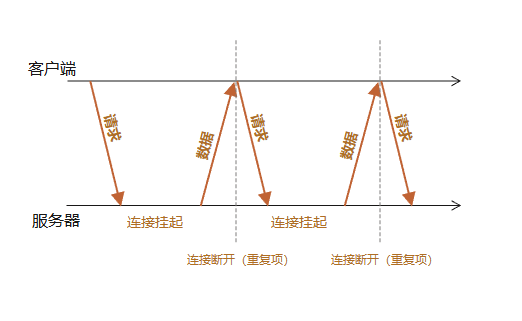
长轮询的应用场景:
- 实时通知:例如,在线聊天应用中,当用户收到新消息时,服务器可以通过长轮询及时推送消息给客户端。
- 在线协作工具:如多人同时编辑文档的应用,长轮询可以用来实时同步用户的编辑操作。
- 游戏更新:在网络游戏中,长轮询可用于实时更新游戏状态,比如玩家位置、得分等信息。
- 股票市场更新:金融应用程序中使用长轮询来实时显示股票价格变动。
- 配置中心:在微服务架构中,配置中心使用长轮询技术来确保各个服务能够即时接收到最新的配置变更。当配置发生更改时,配置中心可以迅速将更新推送到所有相关的服务实例,确保配置的一致性和时效性。
以下示例展示了如何使用长轮询请求:
await httpRemoteService.LongPollingAsync("https://localhost:7044/HttpRemote/LongPolling"
    , async (responseMessage, token) =>
    {
        Console.WriteLine(await responseMessage.Content.ReadAsStringAsync(cancellationToken));
        await Task.CompletedTask;
    }, cancellationToken: cancellationToken);

// 使用构建器模式
await httpRemoteService.SendAsync(HttpRequestBuilder
    .LongPolling("https://localhost:7044/HttpRemote/LongPolling"
    , async (responseMessage, token) =>
    {
        Console.WriteLine(await responseMessage.Content.ReadAsStringAsync(cancellationToken));
        await Task.CompletedTask;
    }), cancellationToken: cancellationToken);
虽然长轮询在一定程度上解决了实时通信的需求,但它也有一些缺点,比如在高并发情况下可能会对服务器造成较大压力,以及长时间的连接可能会影响服务器的性能。随着 Web 技术的发展,Server-Sent Events 或 WebSocket 等更先进的技术逐渐成为实现实时双向通信的首选方案。然而,在某些受限环境中,长轮询仍然是一个可行的选择。
19.13.1 HttpLongPollingBuilder 构建器
HttpLongPollingBuilder 构建器是框架提供专门用来发送长轮询请求所需的各项设置。HttpLongPollingBuilder 的构造函数是私有的,因此无法直接使用 new 关键字进行实例化,不过,框架提供了 HttpRequestBuilder.LongPolling 的多个静态重载方法创建 HttpLongPollingBuilder 的实例。
HttpRequestBuilder.LongPolling(httpMethod, requestUri, onDataReceived, configure);
HttpRequestBuilder.LongPolling(requestUri, onDataReceived, configure); // 默认 GET 请求
此外,HttpLongPollingBuilder 包含以下配置功能:
// 默认为 GET 请求
HttpRequestBuilder.LongPolling("https://localhost:7044/HttpRemote/LongPolling"
    , async (responseMessage, token) =>
    {
        Console.WriteLine(await responseMessage.Content.ReadAsStringAsync(cancellationToken));
        await Task.CompletedTask;
    })

    // 设置轮询重试间隔,默认为 2 秒
    .SetRetryInterval(TimeSpan.FromSeconds(2))

    // 设置最大重试次数,默认为 100 次
    .SetMaxRetries(500)

    // 设置超时时间
    .SetTimeout(TimeSpan.FromMinutes(5))
    .SetTimeout(10 * 60 * 60)   // 毫秒

    // 设置在接收服务器返回 200~299 状态码的数据的操作
    // .SetOnDataReceived(async responseMessage => {})  // 可通过初始时传入

    // 设置在接收服务器返回【非】 200~299 状态码的数据的操作
    .SetOnError(async responseMessage => {})

    // 设置在响应标头包含 X-End-Of-Stream 时触发的操作
    .SetOnEndOfStream(async ResponseMessage => {})

    // 设置长轮询事件处理程序
    .SetEventHandler<CustomLongPollingEventHandler>()
    .SetEventHandler(typeof(CustomLongPollingEventHandler))

    // 设置 HttpRequestBuilder 实例
    .WithRequest(builder => {}));
在通过 HttpRequestBuilder.LongPolling 方法成功构建 HttpLongPollingBuilder 实例后,您可以利用 Send 方法或异步的 SendAsync 方法来执行发送操作。
httpRemoteService.Send(httpLongPollingBuilder, cancellationToken);
await httpRemoteService.SendAsync(httpLongPollingBuilder, cancellationToken);
19.13.2 长轮询事件处理程序
IHttpLongPollingEventHandler 接口允许您定义发送长轮询请求的预处理操作。通过实现该接口,您可以创建自定义的长轮询事件处理程序,例如 CustomLongPollingEventHandler 类:
public class CustomLongPollingEventHandler : IHttpLongPollingEventHandler
{
    // 用于接收服务器返回 200~299 状态码的数据的操作
    public Task OnDataReceivedAsync(HttpResponseMessage httpResponseMessage, CancellationToken cancellationToken) {}

    // 用于接收服务器返回【非】 200~299 状态码的数据的操作
    public Task OnErrorAsync(HttpResponseMessage httpResponseMessage, CancellationToken cancellationToken) {}

    // 用于响应标头包含 X-End-Of-Stream 时触发的操作
    public Task OnEndOfStreamAsync(HttpResponseMessage httpResponseMessage, CancellationToken cancellationToken) {}
}
要在应用程序中启用此处理程序,请在 Startup.cs 或 Program.cs 文件中注册 CustomLongPollingEventHandler 服务:
services.TryAddTransient<CustomLongPollingEventHandler>();
接下来,您可以在构建 HTTP 请求时指定此处理程序:
HttpRequestBuilder.LongPolling("https://localhost:7044/HttpRemote/LongPolling"
    , async (responseMessage, token) =>
    {
        Console.WriteLine(await responseMessage.Content.ReadAsStringAsync(cancellationToken));
        await Task.CompletedTask;
    })
    .SetEventHandler<CustomLongPollingEventHandler>();

HttpRequestBuilder.LongPolling("https://localhost:7044/HttpRemote/LongPolling"
    , async (responseMessage, token) =>
    {
        Console.WriteLine(await responseMessage.Content.ReadAsStringAsync(cancellationToken));
        await Task.CompletedTask;
    })
    .SetEventHandler(typeof(CustomLongPollingEventHandler));    // 使用类型的方式
您可以创建自定义的 IHttpLongPollingEventHandler 接口实现类型,并在多个 HttpLongPollingBuilder 实例中复用该实现。
当 HttpLongPollingBuilder 实例配置了 SetOnDataReceived、SetOnError 或 SetOnEndOfStream 方法时,这些回调方法将会被触发。
如果同时实现了 IHttpLongPollingEventHandler 接口,其方法(OnDataReceivedAsync、OnErrorAsync 和 OnEndOfStreamAsync)的调用时机将晚于 HttpLongPollingBuilder 实例设置的系列方法。
19.13.3 终止长轮询请求
除了使用 CancellationToken 来取消长轮询请求,框架还会检查响应标头中的 X-End-Of-Stream,若存在该标头,则终止长轮询请求。
19.14 Server-Sent Events 单向通信
随着人工智能聊天机器人 ChatGPT 的快速流行,其用户界面中模拟打字机效果的对话设计给人留下了深刻印象。这种生动逼真的交互体验,实际上是通过一种称为“服务器发送事件”(Server-Sent Events, SSE)的技术实现的。
Server-Sent Events 是一种允许服务器主动向客户端(通常是浏览器)发送实时更新数据的通信技术。与传统的客户端请求-服务器响应模式不同,SSE 实现了服务器到客户端的单向、异步通信,从而无需客户端不断轮询服务器以获取最新数据。 这种技术极大地减轻了服务器的负担,并提高了数据传输的效率和实时性。
Server-Sent Events 的应用场景:
- 实时通知:可以用来实现实时的消息提醒或通知系统,如社交网络上的新消息提示或邮件到达通知。
- 数据流更新:对于需要持续更新的数据,如股票价格、天气信息或体育比赛结果,
SSE能够提供即时的数据更新。 - 进度报告:在执行耗时较长的任务时,比如文件上传或复杂计算过程中,
SSE可以用来向客户端报告任务的进度。 - 日志和监控:在开发和运维领域,
SSE可用于实时显示日志文件的变化或监控系统的健康状态。
以下示例展示了如何使用 Server-Sent Events 向服务器获取数据:
await httpRemoteService.ServerSentEventsAsync("https://localhost:7044/HttpRemote/Events"
   // 接收到数据时的操作
   , async (data, token) =>
   {
       Console.WriteLine(data.Data.ToString());
       await Task.CompletedTask;
   }, cancellationToken: cancellationToken);

// 使用构建器模式
await httpRemoteService.SendAsync(HttpRequestBuilder
   .ServerSentEvents("https://localhost:7044/HttpRemote/Events"
   // 接收到数据时的操作
   , async (data, token) =>
   {
       Console.WriteLine(data.Data.ToString());
       await Task.CompletedTask;
   }), cancellationToken: cancellationToken);
data 参数的类型为 ServerSentEventsData,包含以下属性:
- 属性:
Event:事件类型(string类型)。Data:消息(string类型)。Id:事件ID(string类型)。Retry:重新连接的时间(以毫秒为单位的int类型)。CustomFields:自定义的字段数据(IReadOnlyCollection<KeyValuePair<string, string>>类型)。
您还可以监听连接成功和发送异常时的事件:
await httpRemoteService.ServerSentEventsAsync("https://localhost:7044/HttpRemote/Events"
   // 接收到数据时的操作
   , async (data, token) =>
   {
       Console.WriteLine(data.Data.ToString());
       await Task.CompletedTask;
   }, builder => builder
   // 连接打开时操作
   .SetOnOpen(() =>
   {
       Console.WriteLine("连接成功。");
   })
   // 连接未打开时操作
   .SetOnError((ex) =>
   {
       Console.WriteLine("连接错误。" + ex.Message);
   }), cancellationToken: cancellationToken);

// 使用构建器模式
await httpRemoteService.SendAsync(HttpRequestBuilder
   .ServerSentEvents("https://localhost:7044/HttpRemote/Events"
   // 接收到数据时的操作
   , async (data, token) =>
   {
       Console.WriteLine(data.Data.ToString());
       await Task.CompletedTask;
   })
   // 连接打开时操作
   .SetOnOpen(() =>
   {
       Console.WriteLine("连接成功。");
   })
   // 连接未打开时操作
   .SetOnError((ex) =>
   {
       Console.WriteLine("连接错误。" + ex.Message);
   }), cancellationToken: cancellationToken);
Server-Sent Events 特别适合那些需要服务器向客户端发送更新,但客户端不需要频繁向服务器发送请求的应用场景。无论是用于实时更新数据、提供进度报告还是实现简单的通知系统,SSE 都是一个值得考虑的选择。
在发送 Server-Sent Events(服务器发送事件)时,由于它采用 Stream 流式返回数据,如果启用请求分析工具,会导致流式数据的每个部分被提前加载到内存中读取。这不仅会严重影响流式数据的实时显示效果,还可能在返回大量数据时引发内存过高的问题。
因此,建议在发送 Server-Sent Events 请求时关闭请求分析工具。
标准化的 Server-Sent Events (SSE) 仅支持通过 GET 方法接收服务器推送的事件。但框架提供支持通过任意请求谓词(如示例中的 POST)来配置 SSE:
HttpRequestBuilder
   .ServerSentEvents(HttpMethod.Post, new Uri("https://localhost:7044/HttpRemote/Events"));
19.14.1 HttpServerSentEventsBuilder 构建器
HttpServerSentEventsBuilder 构建器是框架提供专门用来接收服务器 Server-Sent Events 推送事件所需的各项设置。HttpServerSentEventsBuilder 的构造函数是私有的,因此无法直接使用 new 关键字进行实例化,不过,框架提供了 HttpRequestBuilder.ServerSentEvents 的多个静态重载方法创建 HttpServerSentEventsBuilder 的实例。
// 默认 GET 请求
HttpRequestBuilder.ServerSentEvents(requestUri, onMessage, configure);
// 自定义请求谓词
HttpRequestBuilder.ServerSentEvents(httpMethod, requestUri, onMessage, configure);
此外,HttpServerSentEventsBuilder 包含以下配置功能:
// 默认为 GET 请求
HttpRequestBuilder.ServerSentEvents("https://localhost:7044/HttpRemote/Events"
    , async (data, token) =>
    {
       Console.WriteLine(data.Data.ToString());
       await Task.CompletedTask;
    })

    // 设置默认重新连接的间隔时间,默认为 2 秒
    .SetDefaultRetryInterval(2000)  // 单位毫秒

    // 设置最大重试次数,默认为 100 次
    .SetMaxRetries(500)

    // 设置用于在与事件源的连接打开时的操作
    .SetOnOpen(() => {})

    // 设置用于在从事件源接收到数据时的操作
    // .SetOnMessage(async (data, token) => {})  // 可通过初始时传入

    // 设置用于在事件源连接未能打开时的操作
    .SetOnError(exception => {})

    // 设置 Server-Sent Events 事件处理程序
    .SetEventHandler<CustomServerSentEventsEventHandler>()
    .SetEventHandler(typeof(CustomServerSentEventsEventHandler))

    // 设置 HttpRequestBuilder 实例
    .WithRequest(builder => {}));
在通过 HttpRequestBuilder.ServerSentEvents 方法成功构建 HttpServerSentEventsBuilder 实例后,您可以利用 Send 方法或异步的 SendAsync 方法来执行发送操作。
httpRemoteService.Send(httpServerSentEventsBuilder, cancellationToken);
await httpRemoteService.SendAsync(httpServerSentEventsBuilder, cancellationToken);
19.14.2 Server-Sent Events 事件处理程序
IHttpServerSentEventsEventHandler 接口允许您定义接收服务器 Server-Sent Events 推送事件的预处理操作。通过实现该接口,您可以创建自定义的 Server-Sent Events 事件处理程序,例如 CustomServerSentEventsEventHandler 类:
public class CustomServerSentEventsEventHandler : IHttpServerSentEventsEventHandler
{
    // 用于在与事件源的连接打开时的操作
    void OnOpen();

    // 用于在从事件源接收到数据时的操作
    Task OnMessageAsync(ServerSentEventsData serverSentEventsData, CancellationToken cancellationToken);

    // 用于在事件源连接未能打开时的操作
    void OnError(Exception exception);
}
要在应用程序中启用此处理程序,请在 Startup.cs 或 Program.cs 文件中注册 CustomServerSentEventsEventHandler 服务:
services.TryAddTransient<CustomServerSentEventsEventHandler>();
接下来,您可以在构建 HTTP 请求时指定此处理程序:
HttpRequestBuilder.ServerSentEvents("https://localhost:7044/HttpRemote/Events"
    , async (data, token) =>
    {
       Console.WriteLine(data.Data.ToString());
       await Task.CompletedTask;
    })
    .SetEventHandler<CustomServerSentEventsEventHandler>();

HttpRequestBuilder.ServerSentEvents("https://localhost:7044/HttpRemote/Events"
    , async (data, token) =>
    {
       Console.WriteLine(data.Data.ToString());
       await Task.CompletedTask;
    })
    .SetEventHandler(typeof(CustomServerSentEventsEventHandler));    // 使用类型的方式
您可以创建自定义的 IHttpServerSentEventsEventHandler 接口实现类型,并在多个 HttpServerSentEventsBuilder 实例中复用该实现。
当 HttpServerSentEventsBuilder 实例配置了 SetOnOpen、SetOnMessage 或 SetOnError 方法时,这些回调方法将会被触发。
如果同时实现了 IHttpServerSentEventsEventHandler 接口,其方法(OnOpen、OnMessageAsync 和 OnError)的调用时机将晚于 HttpServerSentEventsBuilder 实例设置的系列方法。
19.15 WebSocket 双工通信
WebSocket 是一种在单个 TCP 连接上进行全双工通信的协议。WebSocket 使得客户端和服务器之间的数据交换变得更加简单,允许服务端主动向客户端推送数据。在 WebSocket API 中,浏览器和服务器只需要完成一次握手,两者之间就直接可以创建持久性的连接,并进行双向数据传输。
WebSocket 的应用场景:
- 实时聊天应用:
WebSocket可以实现实时的消息传递,使得用户间的交流几乎无延迟。 - 在线游戏:对于需要快速响应的游戏,
WebSocket能够提供低延迟的数据传输。 - 股票市场更新:实时更新股票价格和其他金融信息。
- 协同编辑工具:允许多个用户同时编辑同一个文档,并实时看到其他人的更改。
- 实时地图应用:例如导航应用中实时交通状况的更新。
以下示例展示了如何使用 WebSocketClient 连接服务器:
using var webSocketClient = new WebSocketClient("wss://localhost:7044/ws");    // 支持 ws:// 和 wss://

// 连接成功事件
webSocketClient.Connected += (sender, s) => Console.WriteLine("连接成功");
// 连接关闭事件
webSocketClient.Closed += (sender, args) => Console.WriteLine("连接关闭");
// 接收文本消息
webSocketClient.TextReceived += (sender, s) => Console.WriteLine(s.Message);
// 接收二进制消息
webSocketClient.BinaryReceived += (sender, s) => Console.WriteLine(s.Message);

// 连接服务器
await webSocketClient.ConnectAsync(cancellationToken);

for (var i = 0; i < 10; i++)
{
    // 向服务器发送消息
    await webSocketClient.SendAsync($"Message at {DateTime.UtcNow}\n\n", cancellationToken: cancellationToken);

    await Task.Delay(1000, cancellationToken);
}

// 关闭连接
await webSocketClient.CloseAsync(cancellationToken);
WebSocket 与 Server-Sent Events (SSE) 的区别:
- 通信方向:
WebSocket支持全双工双向通信,SSE仅支持服务器向客户端单向推送数据。 - 协议:
WebSocket使用独立的WebSocket协议 (ws://或wss://),SSE基于HTTP协议。 - 握手过程:
WebSocket需要特殊的HTTP升级头来转换协议,SSE无需特殊握手,直接通过HTTP请求建立连接。 - 连接保持:
WebSocket连接保持直到显式关闭,SSE可能因网络问题断开,但浏览器会自动重连。 - 数据格式:
WebSocket支持多种数据格式,包括二进制数据,SSE数据格式较固定,通常是简单的文本消息。 - 跨域支持:
WebSocket建立连接时检查跨域策略,连接后不受限,SSE依赖于CORS策略。
选择使用 WebSocket 还是 SSE 主要取决于具体的应用需求:
- 如果需要实现双向通信或处理大量数据流,
WebSocket是更好的选择; - 如果只是需要服务器向客户端推送更新,且对数据格式要求不高,
SSE可能更加轻量和易于实现。
19.15.1 WebSocketClient 客户端
框架内置了 WebSocketClient 类型,便于用户通过 ws 或 wss 协议与 WebSocket 服务器建立连接。要使用 WebSocket 功能,首先需要创建并初始化 WebSocketClient 的实例。以下详尽列出了 WebSocketClient 实例所具备的全部功能配置选项:
- 创建
WebSocketClient客户端
以下是创建 WebSocketClient 实例的三种方式,它们分别通过不同的构造函数重载实现,但实质上最终都调用了带有 WebSocketClientOptions 参数的构造函数来配置连接:
// 直接使用 URL 字符串(支持 ws:// 和 wss://)
using var webSocketClient = new WebSocketClient("wss://localhost:7044/ws");

// 使用 Uri 对象
using var webSocketClient = new WebSocketClient(new Uri("wss://localhost:7044/ws"));

// 使用 WebSocketClientOptions 对象进行详细配置
using var webSocketClient = new WebSocketClient(new WebSocketClientOptions("wss://localhost:7044/ws"));

// 配置内部 ClientWebSocketOptions 实例
using var webSocketClient = new WebSocketClient("wss://localhost:7044/ws", options => {});
WebSocketClientOptions 类型包含了多种配置属性,用于定制 ClientWebSocket 连接的详细设置。WebSocketClientOptions,包含以下属性:
- 属性:
ServerUri:服务器地址(Uri类型)。ReconnectInterval:重连的间隔时间(毫秒),默认值为2秒。(TimeSpan类型)。MaxReconnectRetries:最大重连次数,默认10次。(int类型)。Timeout:超时时间(TimeSpan类型)。ReceiveBufferSize:接收服务器新消息缓冲区大小(以字节为单位的int类型)。Configure:用户配置内部ClientWebSocketOptions实例(Action<ClientWebSocketOptions>类型)。
WebSocketClient客户端事件
WebSocketClient 客户端提供了多种事件,允许开发者在 WebSocket 通信的各个阶段插入自定义逻辑。以下示例展示了如何订阅这些事件:
using var webSocketClient = new WebSocketClient("wss://localhost:7044/ws");    // 支持 ws:// 和 wss://

// 开始连接时触发事件
webSocketClient.Connecting += (s, e) => {};

// 连接成功时触发事件
webSocketClient.Connected += (s, e) => { };

// 开始重新连接时触发事件
webSocketClient.Reconnecting += (s, e) => { };

// 重新连接成功时触发事件
webSocketClient.Reconnected += (s, e) => { };

// 开始关闭连接时触发事件
webSocketClient.Closing += (s, e) => { };

// 关闭连接成功时触发事件
webSocketClient.Closed += (s, e) => { };

// 开始接收消息时触发事件
webSocketClient.ReceivingStarted += (s, e) => { };

// 停止接收消息时触发事件
webSocketClient.ReceivingStopped += (s, e) => { };

// 接收文本消息事件,result 为 WebSocketTextReceiveResult 类型
webSocketClient.TextReceived += (s, result) => { };

// 接收二进制消息事件,result 为 WebSocketBinaryReceiveResult 类型
webSocketClient.BinaryReceived += (s, result) => { };
WebSocketTextReceiveResult 类型派生自 WebSocketReceiveResult ,包含以下属性:
- 属性:
Message:文本消息(string类型)。- 其他属性参考 WebSocketReceiveResult
WebSocketBinaryReceiveResult 类型派生自 WebSocketReceiveResult ,包含以下属性:
- 属性:
Message:二进制消息(byte[]类型)。- 其他属性参考 WebSocketReceiveResult
WebSocketClient 客户端方法
WebSocketClient 类封装了与 WebSocket 服务器进行交互的关键操作,具体包括连接、发送消息和关闭连接三种方法。
using var webSocketClient = new WebSocketClient("wss://localhost:7044/ws");    // 支持 ws:// 和 wss://

// 连接服务器
await webSocketClient.ConnectAsync(cancellationToken);

// 向服务器发送消息
await webSocketClient.SendAsync(message, endOfMessage, cancellationToken);  // 发送字符串消息
await webSocketClient.SendAsync(byteArray, endOfMessage, cancellationToken);    // 发送二进制消息
await webSocketClient.SendAsync(message, webSocketMessageType, endOfMessage, cancellationToken);    // 发送指定类型的消息(文本或二进制)

// 关闭连接
await webSocketClient.CloseAsync(cancellationToken);    // 无附加信息关闭
await webSocketClient.CloseAsync(closeStatus, closeDescription, cancellationToken); // 提供关闭状态和描述信息关闭
19.16 HttpContext 转发和代理 ✨
HttpContext 转发是指在 ASP.NET Core 应用程序中,将一个 HTTP 请求的上下文信息(包括请求标头、请求内容、查询字符串、响应标头、响应内容等)从一个请求转发到另一个内部请求或服务的过程。这种技术允许开发者在不改变客户端请求的情况下,将请求重定向到另一个处理点,从而实现请求的代理或路由功能。
HttpContext 转发的应用场景:
API Gateway模式:作为所有外部请求的入口点,将请求路由到正确的后端服务。- 负载均衡和故障转移:将请求转发到其他可用的服务实例,确保系统的稳定性和可靠性。
- 请求日志记录和审计:将请求信息记录到日志系统或审计服务,便于监控和调试。
- 安全过滤和验证:在转发过程中检查请求的认证信息和权限,确保请求的合法性。
- A/B 测试和蓝绿部署:将部分流量路由到新版本的服务,逐步验证新功能。
- 跨域请求处理:处理跨域请求,确保请求能够成功执行。
在使用 HttpContext 进行转发操作之前,请确保已完成以下两个步骤:
若您使用 HttpAgent 独立库,请安装 HttpAgent.AspNetCore 以替代 HttpAgent。
- 注册并启用
IHttpContextAccessor服务。
在 Startup.cs 或 Program.cs 文件中注册并启用 IHttpContextAccessor 服务。
services.AddHttpContextAccessor(); // 若使用 Furion 框架无需注入(已默认注入)
- 启用请求正文缓存中间件,以支持请求内容的重复读取。
app.UseEnableBuffering();
- (可选) 若在转发过程中出现
The SSL connection could not be established, see inner exception.的证书错误问题,您可以通过添加以下配置来忽略SSL证书验证:
// 默认客户端配置
services.AddHttpClient(string.Empty)
    .ConfigurePrimaryHttpMessageHandler(() => new HttpClientHandler
    {
        // 忽略 SSL 证书验证
        ServerCertificateCustomValidationCallback = HttpRemoteUtility.IgnoreSslErrors,
        SslProtocols = HttpRemoteUtility.AllSslProtocols
    });

// 若使用 SocketsHttpHandler,可以通过以下配置来忽略 SSL 证书验证
services.AddHttpClient(string.Empty)
    .ConfigurePrimaryHttpMessageHandler(() => new SocketsHttpHandler()
    {
        SslOptions = new SslClientAuthenticationOptions
        {
            // 忽略 SSL 证书验证
            RemoteCertificateValidationCallback = HttpRemoteUtility.IgnoreSocketSslErrors,
            EnabledSslProtocols = HttpRemoteUtility.AllSslProtocols
        },
    });
以下是一个简单的示例,展示了如何在 ASP.NET Core 中实现 HttpContext 转发:
[ApiController]
[Route("[controller]/[action]")]
public class GetStartController(IHttpRemoteService httpRemoteService, IHttpContextAccessor httpContextAccessor) : ControllerBase
{
    // 转发代理到网站
    [HttpGet]
    [ResponseCache(NoStore = true, Location = ResponseCacheLocation.None)] // 禁用浏览器缓存
    public Task<IActionResult?> ForwardToWebSite()
    {
        return httpContextAccessor.HttpContext.ForwardAsResultAsync("https://github.com");
    }

    // 转发代理到图片
    [HttpGet]
    [ResponseCache(NoStore = true, Location = ResponseCacheLocation.None)] // 禁用浏览器缓存
    public Task<IActionResult?> ForwardToImage()
    {
        return httpContextAccessor.HttpContext.ForwardAsResultAsync(
            "https://img-s-msn-com.akamaized.net/tenant/amp/entityid/AA1u7RJI.img?w=584&h=326&m=6");
    }

    // 转发代理到下载
    [HttpGet]
    [ResponseCache(NoStore = true, Location = ResponseCacheLocation.None)] // 禁用浏览器缓存
    public Task<IActionResult?> ForwardToDownload()
    {
        return httpContextAccessor.HttpContext.ForwardAsResultAsync(
            "https://download.visualstudio.microsoft.com/download/pr/a17b907f-8457-45a8-90db-53f2665ee49e/49bccd33593ebceb2847674fe5fd768e/aspnetcore-runtime-8.0.10-win-x64.exe");
    }

    // 转发代理到表单
    [HttpPost]
    public Task<YourRemoteFormResult?> ForwardToForm(int id, [FromForm] YourRemoteFormModel model)
    {
        return httpContextAccessor.HttpContext.ForwardAsAsync<YourRemoteFormResult>(
            "https://localhost:7044/HttpRemote/AddForm");
    }
}
除了可以手动配置转发目标地址外,系统还支持通过解析 X-Forward-To 请求标头来自动设置目标地址。
通过 HttpContext 转发,可以在 ASP.NET Core 应用程序中结合 Middleware 中间件技术实现灵活的请求路由和处理机制,适用于多种应用场景,如 API Gateway、负载均衡、请求日志记录、安全验证等。
在某些特殊应用场景中,例如通过 GET 请求转发至特定文件或图片时,可能会出现转发失败的情况。这可能是由于 TLS/SSL 证书问题导致的。此时,请确保用于转发的目标应用通过 HTTPS 协议部署网站。
19.16.1 HttpContextForwardBuilder 构建器
HttpContextForwardBuilder 构建器是框架提供专门用来转换 HttpContext 请求上下文所需的各项设置。HttpContextForwardBuilder 的构造函数是私有的,因此无法直接使用 new 关键字进行实例化,不过,框架提供了 HttpContext.CreateForwardBuilder 的多个扩展重载方法创建 HttpContextForwardBuilder 的实例。
httpContext.CreateForwardBuilder(httpMethod, requestUri, forwardOptions);   // forwardOptions 参数的类型为 HttpContextForwardOptions
httpContext.CreateForwardBuilder(requestUri, forwardOptions);   // 自动获取 HttpContext.Request.Method 方法进行设置
框架内部尚未提供手动构建 HttpContextForwardBuilder 并使用 Send/SendAsync 方法进行转发的功能,请改用 ForwardAsync 相关方法。
19.16.2 HttpContextForwardOptions 配置选项
HttpContextForwardOptions 类型专门用于配置 HttpContext 的转发行为。您可以在项目的 Startup.cs 或 Program.cs 文件中注册并配置该服务:
services.Configure<HttpContextForwardOptions>(options =>
{
    // 在此处添加自定义配置
});
此外,您也可以手动创建 HttpContextForwardOptions 实例,并在进行转发时将其传入:
httpContext.ForwardAsResult("https://furion.net", forwardOptions: new HttpContextForwardOptions
{
    // 在此处添加自定义配置
});
HttpContextForwardOptions 包含以下属性:
- 属性:
WithQueryParameters:是否转发查询参数(URL参数),默认值为true(bool类型)。WithRequestHeaders:是否转发请求标头,默认值为true(bool类型)。WithResponseStatusCode:是否转发响应状态码,默认值为true(bool类型)。WithResponseHeaders:是否转发响应标头,默认值为true(bool类型)。WithResponseContentHeaders:是否转发响应内容标头,默认值为true(bool类型)。ResetHostRequestHeader:是否重新设置Host请求标头,默认值为true(bool类型)。IgnoreRequestHeaders:忽略在转发时需要跳过的请求标头列表(string[]?类型)。IgnoreResponseHeaders:忽略在转发时需要跳过的响应标头列表(string[]?类型)。OnForward:用于在转发响应之前执行自定义操作(Action<HttpContext, HttpResponseMessage>类型)。
19.16.3 HttpContext 转发扩展方法
框架为 HttpContext 提供了多种扩展方法,旨在满足各种场景下的 HTTP 请求转发需求。
// 返回 HttpResponseMessage 对象
httpContext.Forward(requestUri, configure, completionOption, forwardOptions);   // 自动获取 HttpContext.Request.Method 方法进行设置
httpContext.Forward(httpMethod, requestUri, configure, completionOption, forwardOptions);
await httpContext.ForwardAsync(requestUri, configure, completionOption, forwardOptions);    // 自动获取 HttpContext.Request.Method 方法进行设置
await httpContext.ForwardAsync(httpMethod, requestUri, configure, completionOption, forwardOptions);

// 返回 HttpRemoteResult<T>
httpContext.Forward<T>(requestUri, configure, completionOption, forwardOptions);    // 自动获取 HttpContext.Request.Method 方法进行设置
httpContext.Forward<T>(httpMethod, requestUri, configure, completionOption, forwardOptions);
await httpContext.ForwardAsync<T>(requestUri, configure, completionOption, forwardOptions); // 自动获取 HttpContext.Request.Method 方法进行设置
await httpContext.ForwardAsync<T>(httpMethod, requestUri, configure, completionOption, forwardOptions);

// 返回目标 T 类型
httpContext.ForwardAs<T>(requestUri, configure, completionOption, forwardOptions);  // 自动获取 HttpContext.Request.Method 方法进行设置
httpContext.ForwardAs<T>(httpMethod, requestUri, configure, completionOption, forwardOptions);
await httpContext.ForwardAsAsync<T>(requestUri, configure, completionOption, forwardOptions);   // 自动获取 HttpContext.Request.Method 方法进行设置
await httpContext.ForwardAsAsync<T>(httpMethod, requestUri, configure, completionOption, forwardOptions);

// 返回字符串类型
httpContext.ForwardAsString(requestUri, configure, completionOption, forwardOptions);   // 自动获取 HttpContext.Request.Method 方法进行设置
httpContext.ForwardAsString(httpMethod, requestUri, configure, completionOption, forwardOptions);
await httpContext.ForwardAsStringAsync(requestUri, configure, completionOption, forwardOptions);    // 自动获取 HttpContext.Request.Method 方法进行设置
await httpContext.ForwardAsStringAsync(httpMethod, requestUri, configure, completionOption, forwardOptions);

// 返回字节数组类型
httpContext.ForwardAsByteArray(requestUri, configure, completionOption, forwardOptions);   // 自动获取 HttpContext.Request.Method 方法进行设置
httpContext.ForwardAsByteArray(httpMethod, requestUri, configure, completionOption, forwardOptions);
await httpContext.ForwardAsByteArrayAsync(requestUri, configure, completionOption, forwardOptions);    // 自动获取 HttpContext.Request.Method 方法进行设置
await httpContext.ForwardAsByteArrayAsync(httpMethod, requestUri, configure, completionOption, forwardOptions);

// 返回 Stream 类型
httpContext.ForwardAsStream(requestUri, configure, completionOption, forwardOptions);   // 自动获取 HttpContext.Request.Method 方法进行设置
httpContext.ForwardAsStream(httpMethod, requestUri, configure, completionOption, forwardOptions);
await httpContext.ForwardAsStreamAsync(requestUri, configure, completionOption, forwardOptions);    // 自动获取 HttpContext.Request.Method 方法进行设置
await httpContext.ForwardAsStreamAsync(httpMethod, requestUri, configure, completionOption, forwardOptions);

// 返回 IActionResult 类型
httpContext.ForwardAsResult(requestUri, configure, completionOption, forwardOptions);   // 自动获取 HttpContext.Request.Method 方法进行设置
httpContext.ForwardAsResult(httpMethod, requestUri, configure, completionOption, forwardOptions);
await httpContext.ForwardAsResultAsync(requestUri, configure, completionOption, forwardOptions);    // 自动获取 HttpContext.Request.Method 方法进行设置
await httpContext.ForwardAsResultAsync(httpMethod, requestUri, configure, completionOption, forwardOptions);

// 返回 object 类型
httpContext.ForwardAs(resultType, requestUri, configure, completionOption, forwardOptions);  // 自动获取 HttpContext.Request.Method 方法进行设置
httpContext.ForwardAs(resultType, httpMethod, requestUri, configure, completionOption, forwardOptions);
await httpContext.ForwardAsAsync(resultType, requestUri, configure, completionOption, forwardOptions);   // 自动获取 HttpContext.Request.Method 方法进行设置
await httpContext.ForwardAsAsync(resultType, httpMethod, requestUri, configure, completionOption, forwardOptions);
使用转发返回 IActionResult 类型时,您可以灵活地转发各种内容,涵盖网页、图片、资源下载与上传、视频、音频、JSON 数据以及文件等。
19.16.4 HttpContext 转发的优势
在对接第三方 API 接口时,通常的做法是创建一个入口程序,并在其中调用 HTTP 远程请求服务来发送请求到指定的第三方接口。假设第三方接口的控制器定义如下:
[ApiController]
[Route("[controller]/[action]")]
public class VendorController : ControllerBase
{
    [HttpPost]
    public VendorModel Add(VendorModel model)
    {
        return model;
    }
}
传统的做法是使用 HTTP 远程请求服务来发送请求,例如:
[ApiController]
[Route("[controller]/[action]")]
public class YourController(IHttpRemoteService httpRemoteService) : ControllerBase
{
    [HttpPost]
    public async Task<VendorModel> AddVendorAsync()
    {
        return await httpRemoteService.SendAsync<VendorModel>(
            HttpRequestBuilder.Post("https://www.example.com/vendor/add")
                .SetJsonContent(new VendorModel())
        );
    }
}
然而,使用 HttpContext 转发功能后,我们可以简化代码,只需创建与第三方接口一致的接口控制器声明,例如 VendorController 的 Add 方法,如下所示:
[ApiController]
[Route("[controller]/[action]")]
public class YourController(IHttpContextAccessor httpContextAccessor) : ControllerBase
{
    [HttpPost]
    public async Task<VendorModel> AddAsync(VendorModel model)  // 同步和异步都行
    {
        // 自动转发 model,无需任何设置
        return await httpContextAccessor.Context
            .ForwardAsync<VendorModel>("https://www.example.com/vendor/add");
    }
}
通过这种方式,代码变得更加简洁明了,无需手动构建和发送 HTTP 请求,而是利用 HttpContext 转发功能直接调用第三方接口。
除了显式地在代码中设置目标地址外,我们还可以通过客户端请求的 X-Forward-To 标头来自动获取转发地址。假设客户端已经设置了请求头 X-Forward-To: https://www.example.com/vendor/add,那么我们的代码可以进一步简化,如下所示:
[ApiController]
[Route("[controller]/[action]")]
public class YourController(IHttpContextAccessor httpContextAccessor) : ControllerBase
{
    [HttpPost]
    public async Task<VendorModel> AddAsync(VendorModel model)  // 同步和异步都行
    {
        // 自动从请求中解析 X-Forward-To 标头地址
        return await httpContextAccessor.Context.ForwardAsync<VendorModel>();
    }
}
通过这种方式,代码变得更加简洁且灵活,能够实现动态地将任何内容转发到目标地址。这种方法的潜力巨大,你可以根据自己的需求进行探索和尝试。
19.16.5 HttpContext 转发在微服务中的应用
在微服务架构中,HttpContext 转发功能展现出了极大的价值。微服务间的通信通常依赖于 HTTP 或 gRPC,其中 HTTP 由于其出色的兼容性而被广泛应用。采用 HttpContext 转发不仅能够简化 HTTP 请求的代码量,还能使代码结构更加清晰,便于维护。对于大型项目或团队协作项目,这一优势尤为明显。
借助 HttpContext 转发功能,我们可以实现动态的请求分发。通过应用某种权重算法,系统能够自动将请求转发至不同的服务器,从而实现负载均衡和故障转移。例如:
[ApiController]
[Route("[controller]/[action]")]
public class YourController(IHttpContextAccessor httpContextAccessor) : ControllerBase
{
    [HttpPost]
    public async Task<VendorModel> AddAsync(VendorModel model)
    {
        string targetUrl = "https://furion.net/"; // 默认服务器地址

        // 根据某种算法(如负载均衡策略)选择目标服务器地址
        // 在微服务架构中,这通常由服务注册与发现机制来确定
        // 下面的代码仅为模拟示例
        if (条件1)
        {
            targetUrl = "https://s1.furion.net/"; // s1 服务器地址
        }
        else if (条件2)
        {
            targetUrl = "https://s2.furion.net/"; // s2 服务器地址
        }
        else if (条件3)
        {
            targetUrl = "https://s3.furion.net/"; // s3 服务器地址
        }

        return await _httpContextAccessor.ForwardAsync<VendorModel>(targetUrl);
    }
}
此外,HttpContext 转发功能还使得构建网关中心成为可能。所有外部请求都可以先发送到网关中心,由网关进行鉴权、限流等处理后,再转发至目标服务。这极大地提升了系统的安全性和可管理性。总之,HttpContext 转发是微服务架构中一个不可或缺的组件,它为实现高效、灵活的微服务通信提供了有力支持。
19.16.6 转发忽略标头说明
在使用 HttpContext 转发功能时,系统会自动忽略以下请求与响应标头,以确保转发的有效性和准确性:
- 请求标头中将被忽略的:
X-Forward-ToHost
- 响应标头中将被忽略的:
Content-TypeTransfer-EncodingKeep-AliveUpgradeProxy-Connection
若需添加更多忽略请求或响应标头的设置,可通过 HttpContextForwardOptions 进行配置。以下是两种配置方式:
- 全局设置:
在项目的 Startup.cs 或 Program.cs 文件中,注册并配置该服务:
services.Configure<HttpContextForwardOptions>(options =>
{
    // 忽略在转发时需要跳过的请求标头列表
    options.IgnoreRequestHeaders = ["Framework"];

    // 忽略在转发时需要跳过的响应标头列表
    options.IgnoreResponseHeaders = ["Content-Length"];
});
- 单次转发设置:
在单次转发时,可传递 HttpContextForwardOptions 进行配置:
httpContext.ForwardAsResult("https://furion.net", forwardOptions: new HttpContextForwardOptions
{
    // 忽略在转发时需要跳过的请求标头列表
    options.IgnoreRequestHeaders = ["Framework"];

    // 忽略在转发时需要跳过的响应标头列表
    options.IgnoreResponseHeaders = ["Content-Length"];
});
若响应标头中包含 Content-Length,且其值与实际响应体大小不一致,可能会导致 “Error while copying content to a stream.” 错误。忽略此标头有助于避免因长度不匹配引起的错误。
19.16.7 ForwardAttribute 转发特性
为了简化转发操作,框架提供了便捷的 [Forward] 控制器操作转发特性。相较于手动调用 HttpContext 的 Forward 扩展方法,该特性显著减少了重复的硬编码工作。以下是使用 [Forward] 特性的示例代码:
[ApiController]
[Route("[controller]/[action]")]
public class GetStartController : ControllerBase
{
    /// <summary>
    ///     转发代理到网站
    /// </summary>
    /// <returns></returns>
    [HttpGet]
    [ResponseCache(NoStore = true, Location = ResponseCacheLocation.None)] // 禁用浏览器缓存
    [Forward("https://github.com")]
    public Task<IActionResult?> ForwardToWebSite()
    {
        throw new NotImplementedException();
    }

    /// <summary>
    ///     转发代理到图片
    /// </summary>
    /// <returns></returns>
    [HttpGet]
    [ResponseCache(NoStore = true, Location = ResponseCacheLocation.None)] // 禁用浏览器缓存
    [Forward("https://img-s-msn-com.akamaized.net/tenant/amp/entityid/AA1u7RJI.img?w=584&h=326&m=6")]
    public Task<IActionResult?> ForwardToImage()
    {
        throw new NotImplementedException();
    }

    /// <summary>
    ///     转发代理到文件
    /// </summary>
    /// <returns></returns>
    [HttpGet]
    [ResponseCache(NoStore = true, Location = ResponseCacheLocation.None)] // 禁用浏览器缓存
    [Forward("https://download.visualstudio.microsoft.com/download/pr/a17b907f-8457-45a8-90db-53f2665ee49e/49bccd33593ebceb2847674fe5fd768e/aspnetcore-runtime-8.0.10-win-x64.exe")]
    public Task<IActionResult?> ForwardToDownload()
    {
        throw new NotImplementedException();
    }

    /// <summary>
    ///     转发代理到表单
    /// </summary>
    /// <param name="id"></param>
    /// <param name="model"></param>
    /// <returns></returns>
    [HttpPost]
    [Forward("https://localhost:7044/HttpRemote/AddForm")]
    public Task<YourRemoteFormResult?> ForwardToForm(int id, [FromForm] YourRemoteFormModel model)
    {
        throw new NotImplementedException();
    }

    /// <summary>
    ///     转发代理到字符串
    /// </summary>
    /// <returns></returns>
    [HttpGet]
    [Forward("https://localhost:7044/GetStart/PostRawString")]
    public Task<string> ForwardToString()
    {
        throw new NotImplementedException();
    }

    /// <summary>
    ///     转发代理到无返回值
    /// </summary>
    /// <returns></returns>
    [HttpGet]
    [Forward("https://localhost:7044/GetStart/PostRawString")]
    public Task ForwardToVoid()
    {
        throw new NotImplementedException();
    }
}
在上述代码中,我们只需为需要转发的控制器操作添加 [Forward] 特性,并指定目标 URL。框架会自动处理转发逻辑,因此方法体内无需编写任何实现代码(通常抛出 NotImplementedException 以表明这是一个由框架自动处理的转发操作)。这种方式在微服务应用中尤为便捷,极大地简化了代码编写和维护工作。
ForwardAttribute 特性适用于方法。
ForwardAttribute 包含以下属性:
- 属性:
RequestUri:转发地址(string类型)。Method:转发方式,若未设置,则自动采用当前请求方式作为转发方式(HttpMethod类型)。HttpClientName:HttpClient实例的配置名称,默认值为null(string类型)。CompletionOption:指示响应内容操作方式,默认值为ResponseContentRead(HttpCompletionOption类型)。WithQueryParameters:是否转发查询参数(URL参数),默认值为true(bool类型)。WithRequestHeaders:是否转发请求标头,默认值为true(bool类型)。WithResponseStatusCode:是否转发响应状态码,默认值为true(bool类型)。WithResponseHeaders:是否转发响应标头,默认值为true(bool类型)。WithResponseContentHeaders:是否转发响应内容标头,默认值为true(bool类型)。IgnoreRequestHeaders:忽略在转发时需要跳过的请求标头列表(string[]类型)。IgnoreResponseHeaders:忽略在转发时需要跳过的响应标头列表(string[]类型)。ResetHostRequestHeader:是否重新设置Host请求标头,默认值为false(bool类型)。
19.17 FTP 客户端功能展望
自 2019 年谷歌 Chrome 浏览器宣布停止对 FTP 协议的支持后,2022 年微软也紧随其后,在其 Edge 浏览器中移除了对 FTP 协议的支持。
尽管当前我们的框架尚未正式集成 FTP 客户端功能,但相关开发工作已初步完成。若未来开发者对 FTP 协议功能的需求日益增长,我们将认真考虑将其纳入框架,以满足广大开发者的需求。
19.18 CancellationToken 取消 HTTP 请求
框架为所有发送 HTTP 远程请求的方法提供了取消功能,只需通过 cancellationToken 参数即可实现。以下是三种取消请求的方法示例:
- 在控制器
Action中定义CancellationToken参数:
当用户关闭浏览器或中断请求时,可以取消 HTTP 远程请求操作。
[ApiController]
[Route("[controller]/[action]")]
public class HttpRemoteController(IHttpRemoteService httpRemoteService) : ControllerBase
{
    [HttpGet]
    public async Task<string?> GetContent(CancellationToken cancellationToken)
    {
        await httpRemoteService.GetAsAsync<string>("https://furion.net/", cancellationToken: cancellationToken);
    }
}
- 利用
HttpContext.RequestAborted属性:
当用户关闭浏览器或中断请求时,可以取消 HTTP 远程请求操作。
[ApiController]
[Route("[controller]/[action]")]
public class HttpRemoteController(IHttpRemoteService httpRemoteService,
    IHttpContextAccessor httpContextAccessor) : ControllerBase
{
    [HttpGet]
    public async Task<string?> GetContent()
    {
        await httpRemoteService.GetAsAsync<string>("https://furion.net/"
            , cancellationToken: httpContextAccessor.HttpContext.RequestAborted);
    }
}
- 创建
CancellationTokenSource对象以手动取消请求:
创建 CancellationTokenSource 实例可以精准的控制取消 HTTP 请求的时机。
[ApiController]
[Route("[controller]/[action]")]
public class HttpRemoteController(IHttpRemoteService httpRemoteService) : ControllerBase
{
    [HttpGet]
    public async Task<string?> GetContent()
    {
        using var cancellationTokenSource = new CancellationTokenSource();
        cancellationTokenSource.CancelAfter(100);

        await httpRemoteService.GetAsAsync<string>("https://furion.net/"
            , cancellationToken: cancellationTokenSource.Token);
    }
}
19.19 HttpClient 实例配置 ✨
HTTP 远程请求服务内部采用 HttpClient 发送请求。通过配置 HttpClient 客户端,可以调整框架发送 HTTP 远程请求的行为。您可以通过以下两种方式配置客户端行为:
全局配置
在 Startup.cs 或 Program.cs 中配置所有请求或特定名称的客户端:
// 为默认客户端启用
services.AddHttpClient(string.Empty, client => {});

// 为特定客户端启用
services.AddHttpClient("weixin", client => {});

// 若需解析服务,可使用以下重载方法
services.AddHttpClient(string.Empty, (serviceProvider, client) => {});
单请求配置
使用 SetHttpClientProvider 为特定请求自定义客户端:
HttpRequestBuilder.Get("https://furion.net/")
    .SetHttpClientProvider(() => (new HttpClient(new HttpClientHandler
    {
        // ...
    }), client => client.Dispose()));
19.19.1 常见属性配置
// 为默认客户端启用
services.AddHttpClient(string.Empty, client =>
{
    // 配置基地址
    client.BaseAddress = new Uri("http://localhost:5000");

    // 配置超时
    client.Timeout = TimeSpan.FromMinutes(10);

    // 配置响应内容的最大缓存字节数
    client.MaxResponseContentBufferSize = 5 * 1024;

    // 配置默认 HTTP 版本
    client.DefaultRequestVersion = HttpVersion.Version10;

    // 配置默认请求标头,如 "User-Agent"
    client.DefaultRequestHeaders.Add("User-Agent", "Mozilla/5.0 (Windows NT 10.0; Win64; x64) AppleWebKit/537.36 (KHTML, like Gecko) Chrome/142.0.0.0 Safari/537.36 Edg/142.0.0.0");

    // 配置默认建立 HTTP 连接时使用的版本策略
    client.DefaultVersionPolicy = HttpVersionPolicy.RequestVersionOrHigher;
});

// 为特定客户端启用
services.AddHttpClient("weixin", client =>
{
    // 配置 HttpClient 属性
});
19.19.2 配置 IHttpClientBuilder
.AddHttpClient(name, configure) 方法返回一个 IHttpClientBuilder 实例,允许进行进一步的配置,比如设置 HttpMessageHandler。
配置默认和特定客户端的示例
// 配置默认客户端
services.AddHttpClient(string.Empty, client => {})
    .ConfigurePrimaryHttpMessageHandler(() => new HttpClientHandler
    {
        // 允许自动重定向
        AllowAutoRedirect = true,

        // 使用默认凭据
        UseDefaultCredentials = true,

        // 启用 Cookie
        UseCookies = true,
    });

// 配置名为 "weixin" 的特定客户端
services.AddHttpClient("weixin", client => {})
    .ConfigurePrimaryHttpMessageHandler(() => new HttpClientHandler());
统一配置所有 HttpClient 实例
除了单独配置每个客户端,您还可以统一配置所有 HttpClient 实例:
services.ConfigureHttpClientDefaults(clientBuilder =>
{
    clientBuilder.ConfigurePrimaryHttpMessageHandler(() => new HttpClientHandler());
});

// 或使用 IHttpRemoteBuilder 扩展方法进行一键配置
services.AddHttpRemote()
    .ConfigureHttpClientDefaults(clientBuilder =>
    {
        clientBuilder.ConfigurePrimaryHttpMessageHandler(() => new HttpClientHandler());
    });
这样的配置方式使代码更加简洁和模块化,便于维护和管理。
19.19.3 配置 SSL 证书
使用 HttpClient 发起 HTTPS 请求时,如果需要配置自定义的 SSL/TLS 证书,通常涉及到使用 HttpClientHandler 类,并通过 ServerCertificateCustomValidationCallback 属性来指定一个回调方法,该方法用于验证服务器的证书。如果需要使用客户端证书,可以通过 HttpClientHandler.ClientCertificates 属性添加。
客户端证书认证
services.AddHttpClient(string.Empty, client => {})
    .ConfigurePrimaryHttpMessageHandler(() =>
        new HttpClientHandler
        {
            ClientCertificates =
            {
                X509CertificateLoader.LoadPkcs12FromFile("path/to/client_certificate.pfx", "password")
            }
        });
自定义服务器证书验证
如果您需要自定义服务器证书的验证逻辑,可以设置 ServerCertificateCustomValidationCallback 属性:
services.AddHttpClient(string.Empty, client => {})
    .ConfigurePrimaryHttpMessageHandler(() =>
        new HttpClientHandler
        {
            ServerCertificateCustomValidationCallback = (message, cert, chain, errors) =>
            {
                // 如果证书是预期的自签名证书,则接受它
                if (cert.Subject == "CN=YourExpectedSubject")
                {
                    return true; // 接受证书
                }

                // 否则,使用默认的验证逻辑
                return errors == System.Net.Security.SslPolicyErrors.None;
            }
        });
忽略 SSL 证书验证
除了配置 SSL 证书,您还可以通过添加以下配置来忽略 SSL 证书验证:
// 默认客户端配置
services.AddHttpClient(string.Empty)
    .ConfigurePrimaryHttpMessageHandler(() => new HttpClientHandler
    {
        // 忽略 SSL 证书验证
        ServerCertificateCustomValidationCallback = HttpRemoteUtility.IgnoreSslErrors,
        SslProtocols = HttpRemoteUtility.AllSslProtocols
    });

// 若使用 SocketsHttpHandler,可以通过以下配置来忽略 SSL 证书验证
services.AddHttpClient(string.Empty)
    .ConfigurePrimaryHttpMessageHandler(() => new SocketsHttpHandler()
    {
        SslOptions = new SslClientAuthenticationOptions
        {
            // 忽略 SSL 证书验证
            RemoteCertificateValidationCallback = HttpRemoteUtility.IgnoreSocketSslErrors,
            EnabledSslProtocols = HttpRemoteUtility.AllSslProtocols
        },
    });
单次请求设置 SSL 证书
除了可以在全局配置中 SSL 证书验证外,您还可以通过 SetHttpClientProvider 方法为单次请求单独设置 SSL 证书。示例代码如下:
HttpRequestBuilder.Get("https://furion.net/")
    .SetHttpClientProvider(() => (new HttpClient(new HttpClientHandler
    {
        // 忽略 SSL 证书验证
        ServerCertificateCustomValidationCallback = HttpRemoteUtility.IgnoreSslErrors,
        SslProtocols = HttpRemoteUtility.AllSslProtocols
    }), client => client.Dispose()));
19.19.4 配置 Proxy 代理服务器
如果需要通过代理服务器发送请求,可以通过配置 HttpClientHandler 的 Proxy 属性来实现。下面是一个示例,展示了如何配置代理服务器,包括基本的身份验证。
services.AddHttpClient(string.Empty, client => {})
    .ConfigurePrimaryHttpMessageHandler(() =>
        new HttpClientHandler   // 或使用 new SocketsHttpHandler {}
        {
            Proxy = new WebProxy("http://proxyserver:8080", false)
            {
                Credentials = new NetworkCredential("username", "password") // 如果需要身份验证
            },
            UseProxy = true // 默认情况下 UseProxy 是 true,确保它被启用
        });
19.19.5 配置 HTTP/3 支持
HTTP/3 是 HTTP 协议的最新版本,基于 QUIC(Quick UDP Internet Connections)协议之上,旨在提供更低的延迟、更高的吞吐量和改进的多路复用能力。您可以添加以下配置来启用 HTTP/3 支持:
// 默认客户端配置
services.AddHttpClient(string.Empty, client =>
{
    // 设置默认请求版本为 HTTP/3
    client.DefaultRequestVersion =  HttpVersion.Version30;

    // 指定版本策略为精确匹配请求版本,确保使用 HTTP/3
    client.DefaultVersionPolicy = HttpVersionPolicy.RequestVersionExact;
});
通过上述配置,我们能够确保在发送 HTTP 远程请求时严格使用指定的 HTTP 版本(即 HTTP/3),从而充分利用 HTTP/3 提供的性能改进和功能优势。
19.19.6 扩展配置(JSON 序列化)
框架通过 IHttpClientBuilder.ConfigureOptions() 扩展方法支持为 HttpClient 配置自定义选项,例如 JSON 序列化行为等。此外,ConfigureOptions 还提供了支持服务解析的重载方法。示例如下:
// 配置默认客户端
services.AddHttpClient(string.Empty)
    .ConfigureOptions(options =>    // 或使用重载:.ConfigureOptions((options, serviceProvider) =>
    {
        options.JsonSerializerOptions.DefaultIgnoreCondition = JsonIgnoreCondition.WhenWritingNull;
    });

// 配置特定客户端
services.AddHttpClient("github")
    .ConfigureOptions(options =>    // 或使用重载:.ConfigureOptions((options, serviceProvider) =>
    {
        options.JsonSerializerOptions.DefaultIgnoreCondition = JsonIgnoreCondition.WhenWritingNull;
    });
通过此配置,可为不同的 HTTP 客户端实例定制 JSON 序列化行为,满足特定远程请求的需求。
19.19.7 服务解析配置
在全局配置 HttpClient 时,有时需要先解析依赖服务,再进行客户端配置。例如,以下示例通过解析配置服务来设置请求基地址:
services.AddHttpClient(string.Empty, (serviceProvider, client) =>
{
    // 解析配置服务
    var configuration = serviceProvider.GetRequiredService<IConfiguration>();
    client.BaseAddress = new Uri(configuration["your-base-address"]);
});
19.19.8 了解更多配置
欲了解更多关于 HttpMessageHandler 和 SocketsHttpHandler 的配置,请查阅微软官方文档:
此外,框架底层通过 IHttpClientFactory 创建 HttpClient 实例,有关 IHttpClientFactory 的详细信息,请参阅微软官方文档:
19.20 DelegatingHandler 请求处理委托(拦截)
DelegatingHandler 是 C# 中 HttpClient 类的一个重要组成部分,它允许你以一种链式的方式处理 HTTP 请求和响应。DelegatingHandler 是一个抽象类,通常用于创建自定义的消息处理器,这些处理器可以被插入到 HTTP 消息处理管道中。通过继承 DelegatingHandler 并重写其 Send 和 SendAsync 方法,你可以实现自定义的行为,比如添加请求头、日志记录、身份验证、错误处理等。
简单来说,DelegatingHandler 可以被视为一个拦截 HTTP 远程请求的“中间件”。
19.20.1 DelegatingHandler 应用场景
- 请求前处理:在请求发送到服务器之前,可以对请求进行修改或增强,例如添加认证信息、设置特定的请求头等。
- 响应后处理:在从服务器接收到响应之后但在最终用户看到结果之前,可以对响应进行处理,如解压、解密、缓存响应等。
- 错误处理:统一处理所有
HTTP请求可能发生的异常,提供一致的错误处理机制。 - 日志记录:记录请求和响应的信息,便于调试和监控。
框架内置的 ProfilerDelegatingHandler 是一个请求分析工具,它通过实现 DelegatingHandler 接口来实现其功能。您可以点击此处查看源码,以深入了解其实现细节。
19.20.2 自定义 DelegatingHandler
以下是一个简单的 DelegatingHandler 示例,展示了如何在请求发送前添加自定义请求头,并在响应接收后记录响应状态码:
public class CustomHandler : DelegatingHandler
{
    protected override HttpResponseMessage Send(HttpRequestMessage httpRequestMessage, CancellationToken cancellationToken)
    {
        // 参考异步 SendAsync 方法
        return base.Send(httpRequestMessage, cancellationToken);
    }

    protected override async Task<HttpResponseMessage> SendAsync(HttpRequestMessage request, CancellationToken cancellationToken)
    {
        // 请求预处理:添加自定义请求头
        request.Headers.Add("Custom-Header", "Value");

        // 发送请求并获取响应
        var response = await base.SendAsync(request, cancellationToken);

        // 响应后处理:记录响应状态码
        Console.WriteLine($"Response status code: {response.StatusCode}");

        return response;
    }
}
DelegatingHandler 的派生类支持通过构造函数进行依赖注入。
接下来,在 Program.cs 或 Startup.cs 文件中注册 CustomHandler:
// 注册 CustomHandler 为服务
services.TryAddTransient<CustomHandler>();

// 为默认 HttpClient 客户端启用 CustomHandler
services.AddHttpClient()
    .AddHttpMessageHandler<CustomHandler>();

// 若为特定命名的 HttpClient 客户端启用,可如下配置
// services.AddHttpClient("weixin")
//     .AddHttpMessageHandler<CustomHandler>();
.AddHttpMessageHandler 方法支持多次调用,以添加多个处理器。例如:
services.AddHttpClient(string.Empty)
    .AddHttpMessageHandler<CustomHandler1>()
    .AddHttpMessageHandler<CustomHandler2>()
    .AddHttpMessageHandler<CustomHandler3>();
注意:处理器的执行顺序为注册顺序,即先注册的处理器先执行。
19.20.3 实现自动刷新授权 Token
在与第三方 API 接口对接时,通常需要在请求头中携带授权 Token。由于 Token 具有时效性,开发者需要定期刷新 Token。以下示例展示了如何通过 DelegatingHandler 实现自动刷新 Token 的逻辑。当响应返回 401 状态码时,系统会自动重新获取授权 Token 并更新请求头。
public class AuthorizationDelegatingHandler : DelegatingHandler
{
    protected override HttpResponseMessage Send(HttpRequestMessage request, CancellationToken cancellationToken)
    {
        // 参考 SendAsync 代码
        return base.Send(request, cancellationToken);
    }

    protected override async Task<HttpResponseMessage> SendAsync(HttpRequestMessage request,
        CancellationToken cancellationToken)
    {
        // 克隆原始请求(解决 StreamContent 只能读取一次的问题)
        var clonedRequest = await request.CloneAsync(cancellationToken);

        // 首次发送请求
        var response = await base.SendAsync(clonedRequest, cancellationToken);

        // 检测 401 状态码
        if (response.StatusCode != HttpStatusCode.Unauthorized)
        {
            return response;
        }

        // 刷新 Token
        var newToken = await GetNewTokenAsync(); // 实现获取新 Token 的逻辑

        // 重新克隆请求并添加新 Token
        clonedRequest = await clonedRequest.CloneAsync(cancellationToken);
        clonedRequest.Headers.Authorization = new AuthenticationHeaderValue("Bearer", newToken);

        // 重试请求
        response = await base.SendAsync(clonedRequest, cancellationToken);
        return response;
    }

    private async Task<string> GetNewTokenAsync()
    {
        // 这里实现获取新 Token 的逻辑
        // 例如:调用身份验证服务获取新的 Token
        return "newToken";
    }
}
接下来,在 Program.cs 或 Startup.cs 文件中注册 AuthorizationDelegatingHandler:
// 注册 AuthorizationDelegatingHandler 为服务
services.TryAddTransient<AuthorizationDelegatingHandler>();

// 为默认 HttpClient 客户端启用 AuthorizationDelegatingHandler
services.AddHttpClient()
    .AddHttpMessageHandler<AuthorizationDelegatingHandler>();

// 若为特定命名的 HttpClient 客户端启用,可如下配置
// services.AddHttpClient("weixin")
//     .AddHttpMessageHandler<AuthorizationDelegatingHandler>();
通过上述代码,我们实现了一个自动刷新 Token 的机制。当 Token 过期时,系统会自动获取新的 Token 并重试请求,从而确保与第三方 API 的持续有效通信。
19.21 HttpClientHandler 发送请求底层处理器
HttpClientHandler 是 .NET 中用于配置和执行实际 HTTP 请求的核心消息处理器。它是 HttpMessageHandler 的具体实现类,通常作为 HttpClient 消息处理管道的最末端,负责与操作系统网络层交互,完成真正的 HTTP 请求发送与响应接收。
虽然 DelegatingHandler 和 HttpClientHandler 都继承自 HttpMessageHandler,但它们在职责上有明显区分:
DelegatingHandler:用于构建可插拔、链式的中间件逻辑(如日志、认证、重试等),本身不直接发起网络请求,而是将请求委托给下一个处理器。HttpClientHandler:是最终执行网络I/O的处理器,封装了平台相关的底层实现(如WinHTTP、libcurl或SocketsHttpHandler),并提供丰富的配置选项来控制连接行为、安全策略、代理设置等。
19.21.1 HttpClientHandler 的核心功能
HttpClientHandler 提供了对 HTTP 客户端行为的精细控制,常见配置包括:
- 自动重定向(
AllowAutoRedirect) Cookie容器管理(UseCookies+CookieContainer)- 代理设置(
Proxy+UseProxy) - 证书验证与 TLS 配置(
ServerCertificateCustomValidationCallback) - 连接超时与请求超时(
Timeout、ConnectTimeout) - 是否使用默认凭据(
UseDefaultCredentials) - 压缩支持(
AutomaticDecompression)
19.21.2 与 DelegatingHandler 的协作关系
当你通过 services.AddHttpClient() 创建 HttpClient 时,.NET 默认会为你提供一个 HttpClientHandler 作为管道的“终点”。所有通过 .AddHttpMessageHandler<T>() 添加的 DelegatingHandler 实例,都会被包装在 HttpClientHandler 之外,形成如下调用链:
CustomHandler3 → CustomHandler2 → CustomHandler1 → HttpClientHandler → 网络
也就是说:
- 请求从最外层的
DelegatingHandler开始,逐层向内传递; - 响应则从
HttpClientHandler返回后,逐层向外回传; HttpClientHandler是唯一真正发出网络请求的组件。
19.21.3 自定义 HttpClientHandler
虽然大多数拦截逻辑应通过 DelegatingHandler 实现,但 HttpClientHandler 本身也是可继承的,允许你在最接近网络 I/O 的层级插入自定义行为。这适用于需要深度控制底层请求/响应流程的场景,例如:
- 模拟特定网络错误
- 在
TLS握手前后注入监控 - 绕过默认的
Cookie或代理处理逻辑 - 捕获或转换底层网络异常
以下是一个继承 HttpClientHandler 的示例,展示了如何在请求发送前添加自定义请求头,并在响应接收后记录状态码:
public class CustomHttpHandler : HttpClientHandler
{
    /// <inheritdoc />
    protected override HttpResponseMessage Send(HttpRequestMessage request, CancellationToken cancellationToken)
    {
        // 参考异步 SendAsync 方法
        return base.Send(request, cancellationToken);
    }

    /// <inheritdoc />
    protected override Task<HttpResponseMessage> SendAsync(HttpRequestMessage request, CancellationToken cancellationToken)
    {
        // 请求预处理:添加自定义请求头
        request.Headers.Add("Custom-Header", "Value");

        // 发送请求并获取响应
        var response = await base.SendAsync(request, cancellationToken);

        // 响应后处理:记录响应状态码
        Console.WriteLine($"Response status code: {response.StatusCode}");

        return response;
    }
}
接下来,在 Program.cs 或 Startup.cs 文件中配置并初始化 CustomHttpHandler:
// 为默认 HttpClient 客户端启用
services.AddHttpClient(string.Empty)
    .ConfigurePrimaryHttpMessageHandler(() => new CustomHttpHandler());

// 若为特定命名的 HttpClient 客户端启用,可如下配置
// services.AddHttpClient("weixin")
//     .ConfigurePrimaryHttpMessageHandler(() => new CustomHttpHandler());
注意:ConfigurePrimaryHttpMessageHandler 设置的是整个管道的底层处理器,它必须是 HttpMessageHandler 的具体实现(如 HttpClientHandler、SocketsHttpHandler),不能是 DelegatingHandler。
19.21.4 最佳实践建议
- 不要轻易替换默认的
HttpClientHandler,除非你需要特殊的安全或连接行为。 - 若需添加业务逻辑(如日志、重试、认证),优先使用
DelegatingHandler。 - 在需要精细控制
TLS、代理、Cookie或超时策略等底层网络行为时,才考虑自定义HttpClientHandler。
19.22 RateLimitedStream 带速率限制的流
在 SaaS/PaaS 应用平台中,用户常根据资源使用量(如带宽和流量)付费。特别是在用户下载或上传资源时,平台会进行速率限制。此时,框架提供的 RateLimitedStream 流非常有用。该流能够根据设定的速率限制调整读写速度,非常适合用于资源控制。
使用 RateLimitedStream 非常简单,只需通过构造函数传入需速率控制的 Stream 对象及每秒允许的最大字节数 bytesPerSecond。例如:
var stream = await httpRemoteService.GetAsStreamAsync("https://furion.net/", HttpCompletionOption.ResponseHeadersRead);

// 使用 RateLimitedStream 包装流并返回新的流,后续操作使用 rateLimitedStream 代替 stream 即可
var rateLimitedStream = new RateLimitedStream(stream, 1024 * 1024 * 1); // 限制最大读写速率为 1MB/s

// 此时对 rateLimitedStream 的读写操作将被控制在 1MB/s 以内。✅
RateLimitedStream特别适用于上传和下载资源的速率控制。- 它基于令牌桶算法实现,确保速率控制的有效性。
- 请注意,由于实现机制和系统负载等因素,实际速率可能会有约
5%的误差,这是正常现象。
总的来说,RateLimitedStream 是一个强大的流包装器,能够帮助开发者在 SaaS/PaaS 平台上更好地管理资源使用,确保用户操作符合付费条件,同时提升系统稳定性和性能。
19.23 FileTypeMapper 文件 MIME 类型映射
在文件上传和下载过程中,通常需要依据文件扩展名来获取或设置其 MIME 类型。这一步骤往往要求开发者手动进行正确设置。为了减轻开发者负担,框架提供了 FileTypeMapper 类型,它能够根据文件扩展名自动返回对应的 MIME 类型。例如:
var fileTypeMapper = new FileTypeMapper();

fileTypeMapper.TryGetContentType("image.jpg", out var mimeType); // mimeType 为 "image/jpeg"
fileTypeMapper.TryGetContentType("image.png", out mimeType);    // mimeType 为 "image/png"
框架内置了一个包含 389 种文件扩展名及其对应 MIME 类型的字典,几乎覆盖了所有主流和非主流的文件类型。
此外,框架提供的所有添加文件内容的方法(如 AddFile、AddFileAsStream、AddFileAsByteArray、AddFileFromRemote 等)在用户未指定 contentType 参数时,会自动解析文件的 MIME 类型。若无法解析,则默认设置为 application/octet-stream。例如:
var content = await httpRemoteService.PostAsStringAsync("https://localhost:7044/HttpRemote/AddForm?id=1",
    builder => builder.SetMultipartContent(multipart =>
    {
        // 不传递 contentType,自动解析为 "image/jpeg"
        multipart.AddFileAsStream(@"C:\Workspaces\httptest.jpg", "file")
    }));
借助框架的自动解析功能,开发者在上传文件时无需再手动查找文件的 MIME 类型,从而大大简化了操作流程。
19.24 DigestCredentials 摘要身份认证
Digest 摘要身份认证是一种在 HTTP 协议中用于验证用户身份的增强安全性的方法,相较于基本的 HTTP Basic 认证,它更为安全。在 Digest 认证过程中,用户的密码不会以明文形式在网络上传输,而是通过加密处理后再发送,从而提升了安全性。框架提供了 DigestCredentials 类型,便于生成摘要授权凭证:
// 向指定服务器发起请求,并生成摘要认证所需的授权凭证字符串
var digestCredentials = DigestCredentials.GetDigestCredentials("https://furion.net/digest", "admin", "a123456789", HttpMethod.Get);

// 将生成的授权凭证字符串设置为 Authorization 请求标头的值
httpRequestMessage.Headers.Authorization = new AuthenticationHeaderValue("Digest", digestCredentials);

// 再次发起请求
这样,通过 DigestCredentials 类型,可以方便地实现 Digest 摘要身份认证,确保用户身份的安全验证。
19.25 请求和响应策略(重试)
在发送 HTTP 远程请求时,常常需要实现重试逻辑,尤其是在请求失败的情况下。为此,框架提供了 Policy 静态类,用于统一配置请求与响应的处理策略。
基础重试示例
以下是一个使用 Policy 实现基础重试策略的示例:
var str = await Policy<string>.Retry(3)   // 重试三次(泛型为返回值类型)
            .ExecuteAsync(async () => await httpRemoteService.GetAsStringAsync("https://furion.net/"));
高级重试配置
您可以进一步细化重试条件和行为,例如指定异常类型、设置重试间隔以及监听重试事件:
var str = await Policy<string>.Retry(3)   // 重试三次(泛型为返回值类型)
            .Handle<HttpRequestException>() // 仅当发生 HttpRequestException 时重试(可不配置)
            .OnWaitRetry((context, delay) =>
            {
                Console.WriteLine($"等待 {delay.TotalSeconds} 秒后进入重试操作.");
            })
            .OnRetrying(context =>  // 每次重试前触发
            {
                Console.WriteLine($"正在重试第 {context.RetryCount} 次...");
            })
            .WaitAndRetry(TimeSpan.FromSeconds(1), TimeSpan.FromSeconds(3)) // 设置重试间隔时间范围
            .ExecuteAsync(async () => await httpRemoteService.GetAsStringAsync("https://furion.net/"));
需要注意的是,只有在 ExecuteAsync 内部方法抛出异常时才会触发重试机制。如果 GetAsStringAsync 返回非 2xx 状态码但未抛出异常(如直接返回错误文本),则不会触发重试。为避免此类情况,建议使用 EnsureSuccessStatusCode() 方法强制在非 2xx 状态码下抛出异常:
.ExecuteAsync(async () => await httpRemoteService.GetAsStringAsync("https://furion.net/"
            , builder => builder.EnsureSuccessStatusCode()));
更多关于 Policy 策略功能的使用和配置,将在后续的章节中详细阐述。
19.26 HTTP 请求日志(关闭)
默认情况下,系统会在发送 HTTP 远程请求时打印相关日志信息,如下所示:
info: System.Net.Http.HttpClient.Default.LogicalHandler[100]
      Start processing HTTP request GET https://furion.net/
info: System.Net.Http.HttpClient.Default.ClientHandler[100]
      Sending HTTP request GET https://furion.net/
info: System.Net.Http.HttpClient.Default.ClientHandler[101]
      Received HTTP response headers after 93.0553ms - 200
info: System.Net.Http.HttpClient.Default.LogicalHandler[101]
      End processing HTTP request after 122.2355ms - 200
若您希望关闭这些日志信息,可以在项目的 appsettings.json 以及 appsettings.Development.json 配置文件中进行如下设置:
{
  "Logging": {
    "LogLevel": {
      "Default": "Information",
      "Microsoft.AspNetCore": "Warning",
      "Microsoft.EntityFrameworkCore": "Information",
      "System.Net.Http.HttpClient": "Warning"  // 将日志级别设置为 Warning 以关闭 Info 级别日志
    }
  }
}
通过将 System.Net.Http.HttpClient 的日志级别设置为 Warning,您可以有效地关闭 Info 级别的 HTTP 请求日志信息。请注意,在 appsettings.Development.json 中的设置将覆盖 appsettings.json 中的相应设置(如果两者都存在的话),这通常用于在开发环境中提供不同的日志记录策略。
除了上述配置方式,您还可以在程序中关闭 HTTP 远程请求的日志记录。具体操作如下:
// 为默认客户端关闭日志
services.AddHttpClient(string.Empty)
    .RemoveAllLoggers();

// 为特定客户端关闭日志
//services.AddHttpClient("weixin")
//    .RemoveAllLoggers();

// 还可以一键为所有客户端配置关闭日志
services.ConfigureHttpClientDefaults(clientBuilder =>
{
    clientBuilder.RemoveAllLoggers();
});

// 或使用 IHttpRemoteBuilder 扩展方法进行一键配置
services.AddHttpRemote()
    .ConfigureHttpClientDefaults(clientBuilder =>
    {
        clientBuilder.RemoveAllLoggers();
    });
19.27 应用案例
这里汇总了流变对象在应用开发中的常见案例。
19.27.1 使用流变对象 Clay 构建和接收请求数据
流变对象(Clay)在 HTTP 远程请求中的应用场景非常广泛,尤其是在与第三方 API 接口对接时。通常,这些接口需要传递或接收 JSON 格式的数据,而流变对象可以简化数据的构建和解析过程。以下是如何在 HTTP 远程请求模块中使用流变对象的配置步骤:
1. 配置流变对象 JSON 序列化转换器
在使用流变对象进行 HTTP 远程请求时,首先需要配置 AddClayConverters(),以便将流变对象序列化为 JSON 格式字符串。配置示例如下:
services.AddHttpRemote(options => {})
    .ConfigureOptions(options =>
    {
        options.JsonSerializerOptions.AddClayConverters();
    });
2. 发送和接收 JSON 数据
配置完成后,可以使用流变对象构建请求内容并发送 HTTP 请求,同时将响应内容转换为流变对象进行处理。以下是一个示例:
// 构建请求内容
dynamic payload = new Clay();
payload.id = 1;
payload.name = "furion";

// 发送 HTTP 远程请求
var content = await httpRemoteService.PostAsStringAsync("https://localhost:7044/HttpRemote/AddModel",
    builder => builder.SetJsonContent(payload));

// 将响应内容转化为流变对象
dynamic clay = Clay.Parse(content);
自定义 Clay 内容转换器简化手动转换 ✅
为了简化代码,避免手动将 JSON 格式字符串转换为流变对象(如 dynamic clay = Clay.Parse(content);),可以自定义 ClayContentConverter 内容转换器。通过这种方式,您可以直接在 HTTP 请求中使用 Clay 类型作为泛型接收参数。以下是自定义转换器的实现:
【一键下载 ClayContentConverter.cs 文件】✅
public class ClayContentConverter : HttpContentConverterBase<Clay>
{
    /// <inheritdoc />
    public override Clay? Read(HttpResponseMessage httpResponseMessage,
        CancellationToken cancellationToken = default)
    {
        var str = httpResponseMessage.Content.ReadAsStringAsync(cancellationToken).GetAwaiter().GetResult();

        return Clay.Parse(str); // 或使用 Clay.Parse(str, ClayOptions.Flexible); // 忽略属性大小写
    }

    /// <inheritdoc />
    public override async Task<Clay?> ReadAsync(HttpResponseMessage httpResponseMessage,
        CancellationToken cancellationToken = default)
    {
        var str = await httpResponseMessage.Content.ReadAsStringAsync(cancellationToken);

        return Clay.Parse(str); // 或使用 Clay.Parse(str, ClayOptions.Flexible);    // 忽略属性大小写
    }
}

// 支持 dynamic 类型转流变对象(可选,但推荐!!!)
public class DynamicContentConverter : HttpContentConverterBase<dynamic>
{
    /// <inheritdoc />
    public override dynamic? Read(HttpResponseMessage httpResponseMessage,
        CancellationToken cancellationToken = default)
    {
        var str = httpResponseMessage.Content.ReadAsStringAsync(cancellationToken).GetAwaiter().GetResult();

        return Clay.Parse(str); // 或使用 Clay.Parse(str, ClayOptions.Flexible); // 忽略属性大小写
    }

    /// <inheritdoc />
    public override async Task<dynamic?> ReadAsync(HttpResponseMessage httpResponseMessage,
        CancellationToken cancellationToken = default)
    {
        var str = await httpResponseMessage.Content.ReadAsStringAsync(cancellationToken);

        return Clay.Parse(str); // 或使用 Clay.Parse(str, ClayOptions.Flexible);    // 忽略属性大小写
    }
}
随后,在 Startup.cs 或 Program.cs 文件中,配置并注册 HttpRemote 服务,以启用自定义内容转换器功能:
services.AddHttpRemote(options =>
{
    options.AddHttpContentConverters(() => [ new ClayContentConverter(), new DynamicContentConverter()]);   // new DynamicContentConverter()(可选,但推荐!!)
});
配置完成后,可以直接使用流变对象类型 Clay 作为泛型接收参数:
// 发送 HTTP 远程请求,将响应内容转化为流变对象
dynamic clay = await httpRemoteService.PostAsAsync<Clay>("https://localhost:7044/HttpRemote/AddModel",
    builder => builder.SetJsonContent(payload));

// 如果配置了 DynamicContentConverter,那么也可以使用 dynamic 接收
dynamic clay = await httpRemoteService.PostAsAsync<dynamic>("https://localhost:7044/HttpRemote/AddModel",
    builder => builder.SetJsonContent(payload));
ClayJsonConverter/AddClayConverters():用于将流变对象序列化为JSON格式字符串,通常作为输入参数使用。ClayContentConverter/DynamicContentConverter:用于将JSON格式字符串反序列化为流变对象,通常作为输出参数使用。
通过结合流变对象与 HTTP 远程请求,开发者可以更高效地处理动态 JSON 数据,简化第三方 API 的对接流程。流变对象的动态特性使得数据的构建和解析更加灵活,同时自定义内容转换器进一步提升了开发效率。
19.27.2 在 Blazor WebAssembly 应用中使用
HTTP 远程请求支持在 Blazor WebAssembly 客户端应用中使用。以下是配置和使用的详细步骤:
1. 注册 HttpRemote 服务
在 Startup.cs 或 Program.cs 文件中,注册 HttpRemote 服务并配置 FallbackBaseAddress:
builder.Services.AddHttpRemote()
    .ConfigureOptions((options, serviceProvider) =>
    {
        var navigation = serviceProvider.GetRequiredService<NavigationManager>();
        options.FallbackBaseAddress = new Uri(navigation.BaseUri);
    });
2. 在 _Imports.razor 中引入命名空间
在 _Imports.razor 文件中,添加 HttpRemote 服务的命名空间:
@using HttpAgent; // 如果使用 Furion 框架,则使用 @using Furion.HttpRemote;
3. 在 *.razor 文件中使用
在 *.razor 文件中注入 IHttpRemoteService 并发送 HTTP 远程请求:
@page "/weather"
@inject IHttpRemoteService Http

// 其他代码...

@code {
    private WeatherForecast[] forecasts;

    protected override async Task OnInitializedAsync()
    {
        forecasts = await Http.GetAsAsync<WeatherForecast[]>("sample-data/weather.json");
    }
}
通过以上步骤,您可以在 Blazor WebAssembly 应用中轻松使用 HTTP 远程请求功能,动态获取数据并渲染到页面中。